

Text to Speech for WordPress, Built by Us
We built a WordPress plugin that reads your content aloud with natural AI voices. It creates audio automatically every time you publish, in more than 90 languages. Visitors choose for themselves whether to read or listen.
Built on ElevenLabs. Downloaded 27,000+ times and used on sites worldwide, from Stanford University to Haymarket Media. Free version, no card required.
In Short
What Is Text to Speech?
Text to speech turns written content into audio. An AI voice reads your article aloud, and visitors can listen instead of reading.
For many readers, audio decides whether they take in the content. Some have low vision, some have reading difficulties, and many want to hear the article while doing something else.
Modern text to speech uses natural AI voices. They sound realistic, with the right stress and pauses, and you never have to record or edit audio yourself.
How We Built the Plugin
We made it because we needed it ourselves. Four choices determine how it behaves on your website.
Real AI Voices From ElevenLabs
We chose the voice engine that produces the most natural speech across 90+ languages. Over 600 voices, with the right stress and pauses.
Audio That Creates Itself
Publish a post and the audio file is created by itself. Change the text, and you regenerate the audio with one click.
The Audio Lives With You
Audio files are stored in your own WordPress media library. You can download them, move them or use them elsewhere.
Built for Speed
Caching and preloading keep the player from weighing down your pages. Fast loading is part of good SEO.
Natural AI Voices in More Than 90 Languages
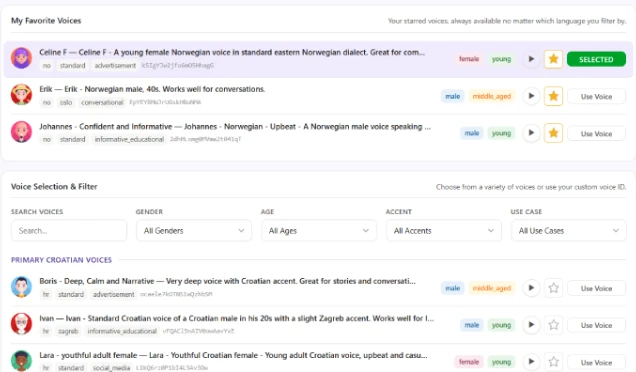
Choose between over 600 voices across 90+ languages. Filter by language, gender, age and use case, and preview the voice before you pick it. Audio quality is up to 192 kbps MP3, with adjustable speed.
- English
- Spanish
- German
- French
- + 66 more
A Player Everyone Can Use, Customized Without Code
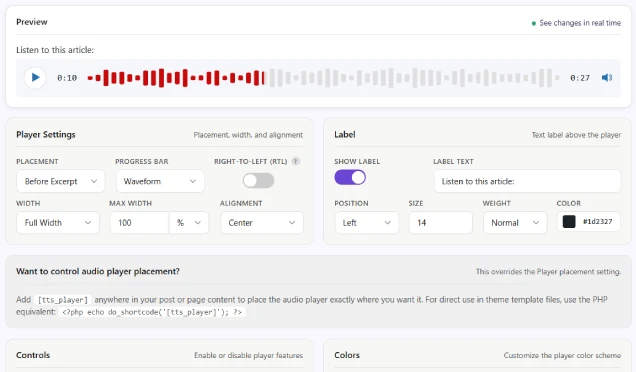
The player follows WCAG 2.1 level AA. It can be controlled from the keyboard, read by screen readers, and has good contrast. Users who know the shortcuts get through quickly.
You decide placement, width, colors, fonts and which buttons appear. Everything is done visually in WordPress, and you see the changes right away. Need more, add your own CSS.
See What People Actually Listen To
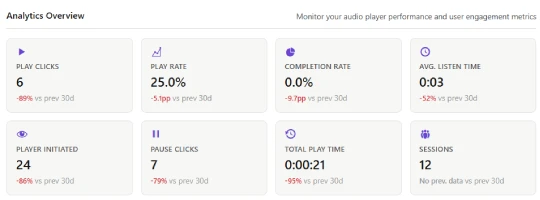
Plays, pauses, downloads and average listening time appear right in the WordPress panel. You see which pages work, and where the player should move.
Put the Narration Where You Want It
Insert the player anywhere with a shortcode. Use parameters for label, autoplay and voice, or build the code in the built-in generator.
Fits Into the Setup You Have
The plugin works in large and established WordPress installations. It works with page builders, multilingual plugins and online stores, without you having to change your theme.
Everything You Get
These features come with both the free version and PRO.
Page builder support
Works with popular page builders like Elementor, Divi, Visual Composer and Beaver Builder.
Define post types
Choose which post types can generate audio.
Narrate the post title
Decide whether the post title is read aloud in the audio.
Narrate the author name
Choose whether the author's name is included in the narration.
Narrate the publish date
Choose whether the publish date is included in the audio.
Include the excerpt
Decide whether the excerpt is read before the main content.
Easy audio regeneration
Regenerate the audio file quickly when the content has changed.
Download audio
Download the audio file directly from the admin panel.
Content selectors
Choose exactly which posts or pages get narration.
Include or block CSS
Pick CSS classes or elements to include in or exclude from audio generation.
Customize the player live
Change the player's appearance directly on your website.
Filter voices
Sort and filter voices by language, dialect and characteristics.
Shortcode generator
Generate simple shortcodes to quickly place players in posts and pages.
Performance settings
Improve speed with caching and preloading of audio files.
Import/export settings
Export and import your settings quickly between websites.
TTS generator panel (coming soon)
A clean panel view for creating audio files directly from text.
How to Get It
Free, PRO or Included in the SLA
The plugin is free to try, and comes in a PRO version with more voices and languages. We developed the plugin. TTSWP owns and sells it. If you are a customer of ours, you get PRO at no extra cost.
- 10,000 welcome credits (about 10 min of speech)
- Optional: your own ElevenLabs key adds 10,000 free credits every month
- English and Norwegian
- 160 kbps MP3 audio quality
- Shortcode and customizable player
- Support via the WordPress forum
- 50,000 audio credits/month (about 1 hour of speech)
- All 90 languages included
- 192 kbps MP3, WooCommerce support and statistics
- Automatic audio on new posts
- Phone and email support
If you have a Service Level Agreement (SLA) with us, you get PRO at no extra cost. We handle the setup and operation.
See the SLASeven Good Use Cases for Text to Speech
Where audio gives the most back, you quickly see it in the time people spend on the page.
Long articles
Long texts are rarely read to the end. Audio keeps the reader with you through the whole piece.
Accessibility
Make the content available to readers with low vision, reading difficulties or concentration challenges.
Online stores
Long product descriptions can be read aloud while the customer looks at the photos.
Courses and e-learning
Audio brings learning material, guides and instructions to life and makes them easier to absorb.
News and high tempo
Let readers listen their way through new stories while doing something else.
Museums and culture
Offer narration of exhibition texts in several languages, right from the website.
Multilingual sites
Correct pronunciation in the reader's own language lowers the threshold for international visitors.
Frequently Asked Questions
Wondering about something else? Contact us, and we are happy to help.
Hear the plugin in use at Stanford University and Haymarket Media, and on our own blog.
What Is Text to Speech - TTSWP?
A WordPress plugin that reads your website content aloud with natural AI voices. It makes the content available to readers with low vision and to everyone who likes to listen.
What makes the plugin special?
We built it because we needed it ourselves. Audio is created automatically on publish, the files are stored with you, and the player can be customized without code. Mementor develops and maintains the plugin, while TTSWP owns and sells it.
Is it free?
Yes. You download the free version from WordPress.org and use it as long as you like. You get 10,000 welcome credits when you connect your site. You buy PRO at TTSWP from $3.99 a month, with all 90 languages and more credits. If you are a customer of ours, PRO is included in the SLA.
Where are the audio files stored?
In your own WordPress media library. You can download them, move them or use them elsewhere, and you keep them even if you stop using the plugin.
Can I choose where the player appears?
Yes. You can show it before the title, after the title or after the content. You can also use a shortcode to place it exactly where you want.
Does the plugin support multilingual sites?
Yes, the PRO version is tested with popular translation plugins like Weglot and WPML. The narration automatically follows the language of the page.
Do I need to register with ElevenLabs?
No. You get 10,000 welcome credits when you connect your site, with no ElevenLabs account. If you want 10,000 extra free credits every month, you can optionally connect your own ElevenLabs key.
What happens if I run out of audio credits?
The audio you have created keeps playing. New audio is generated when you top up credits, when the monthly PRO credits renew, or when your own ElevenLabs key takes over.
Who owns and sells the plugin?
Mementor developed the plugin. TTSWP owns it and handles sales and PRO. The free version lives on WordPress.org. If you are a customer of ours, you get PRO through the SLA.
Latest on AI and Text to Speech
See all articles →


Ready to Let Your Website Speak?
Download the free version and try it on your own content today. If you want PRO without thinking about setup, you get it included in a Service Level Agreement (SLA) with us.