LinkedIn advertising is expensive per click and precise per person. It lets you show your ad to CFOs at companies of a specific size in a specific region, before they've even started searching. For B2B companies, it's often the only channel that can do this.
Here's how the targeting works, the four ad formats, what advertising costs, setup step by step, and the two mistakes that most often leave campaigns with impressions but no inquiries.
In Short
LinkedIn advertising lets you show ads to specific roles at specific companies, before they've started searching. Clicks typically cost $5 to $10, so the channel pays off for B2B services with high customer value. Set one goal, build an audience of 20,000 to 80,000 people, give them something useful, and measure inquiries from day one.
What You'll Learn in This Post
- What LinkedIn advertising is, and why it suits B2B marketing better than other channels
- The targeting that sets LinkedIn apart from Google and Meta
- The ad formats that matter for B2B, and which one you should start with
- What it costs, and why clicks are more expensive than on Google
- Setup step by step, from goal to measurement
- What it takes for the ads to generate inquiries, not just impressions
What Is LinkedIn Advertising?
LinkedIn advertising is paid ads in LinkedIn's feed and sidebar, managed from the Campaign Manager tool. You pay per click or per impression, depending on what the campaign is meant to achieve.
What sets LinkedIn apart from Google and Meta is who you can choose to reach. LinkedIn has over 1 billion users in more than 200 countries, according to LinkedIn itself, and each user has provided their job title, company, industry, and seniority. That information is what you can target on.
Why LinkedIn Suits B2B Marketing
LinkedIn suits B2B marketing because you can show the ad to exactly the roles that make the decision, regardless of what they're searching for. On Google, someone first has to search for what you sell. On LinkedIn, you can reach CFOs at companies with 50 to 200 employees in Vestland, before they know they need you.
The price of that precision is higher click costs and longer sales cycles. LinkedIn is therefore poorly suited to fast sales of cheap products, and well suited to services and systems with high value per customer and several people involved in the decision.
The Targeting: What Sets LinkedIn Apart From Everything Else
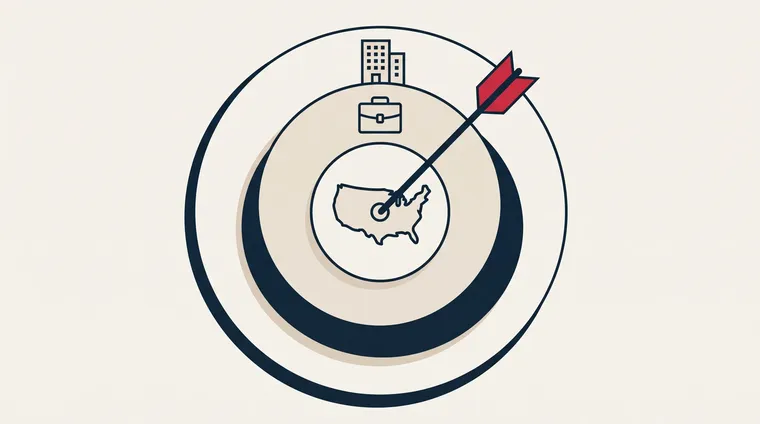
In Campaign Manager, you build the audience from what users themselves have provided. The key choices are:
- Job title and function: "CFO," "managing director," "procurement." Function is broader and safer than title, because titles vary between companies.
- Seniority: From staff level to top executive. If you're selling to decision-makers, you filter out the lowest levels.
- Company size and industry: Employees at companies with 11 to 50 employees in one industry is a completely different audience than large corporations.
- Geography: Country, county, or city. For most companies, this is what keeps the budget down.
- Your own lists: Upload a list of companies you want to reach, or email addresses of existing contacts, and show ads only to them.
LinkedIn itself recommends audiences of 50,000 or more. Our advice for most B2B budgets is 20,000 to 80,000 people, because a well-defined B2B niche is rarely larger. If the audience gets smaller, LinkedIn has too little to deliver on. If it gets larger, you pay for people who will never become customers.
The Ad Formats That Matter for B2B
LinkedIn has over ten ad formats, from text ads in the sidebar to ads on smart TVs. For a B2B company just starting out, five of them count.
- Single image in the feed: One image, one text, one link. Easiest to create and easiest to measure. Start here.
- Carousel: Several images people can scroll through, each with its own link. Suits showing multiple services or the steps in a process.
- Video: Short video in the feed. Suited to explaining something complicated, but requires production.
- Document: A guide or checklist people can browse through directly in the feed. Often gives cheaper engagement than image ads, and lets you collect contact information in exchange for the download.
- Thought leader ads: You sponsor a post from an employee instead of from the company page. They often outperform company posts, because they look like professionals' own posts, and that's exactly who the ad is competing with in the feed.
Message ads in the inbox exist, but in the EU they're only sent to users who have themselves consented to ads in their inbox. There are few of them, so the reach is small.
What Does LinkedIn Advertising Cost?
The price is set in an auction, as with Google Ads, and LinkedIn itself describes the model as goal-based: what you pay for depends on what the campaign is meant to achieve. If you choose website visits, you only pay when someone clicks, according to LinkedIn's pricing page.
LinkedIn doesn't publish fixed prices, but third-party measurements for 2026 put it around 5 to 10 dollars per click and 60 to 175 dollars per lead, according to Hootsuite. In practice that typically means $5 to $10 per click, several times the price of Google Search. That's not a problem if one customer is worth tens of thousands, and a big problem if they're worth a few hundred. Calculate backward from customer value before you set a budget.
With us, managing LinkedIn advertising costs the same as Google Ads: the Visibility Package at $499 per month and the Dominance Package at $999, with a one-time setup fee of $499. The ad budget comes on top and is paid directly to LinkedIn. You own the account. The details are on the LinkedIn advertising service page.
Setup Step by Step
1. Set One Goal
Choose whether the campaign should generate inquiries, downloads, or visits. The goal governs both what LinkedIn optimizes for and what you pay for. "Awareness" is rarely a good goal for a small company, because it can't be counted in revenue.
2. Build the Audience
Combine function, seniority, company size, and geography until you're between 20,000 and 80,000 people. Save it as an audience you can reuse.
3. Create an Offer People Will Want
An ad that says "we're an agency" gets no clicks. An ad that gives a concrete checklist, a price, or a worked example does. On LinkedIn, you're competing with professionals' own posts, so the ad has to be just as useful as they are. We learned that on the ads for our own marketing agency.
4. Send to a Page That Continues the Conversation
The landing page should be about what the ad promised, with one next step. The form should be short. LinkedIn also has its own forms that are filled out inside the ad, with profile data pre-filled. They give more submissions, but often lower quality, so test both.
5. Measure Inquiries, Not Impressions
Install LinkedIn's tracking code, the Insight Tag, on the website, connected to the consent solution in the same way as the Google tag. Set up conversions for forms and phone calls. Connect the numbers to your CRM, so you can see which ads generated meetings, not just clicks. After four weeks, you should be able to say what one inquiry cost.
How to Make the Ads Generate Inquiries
The most common mistake we see is that the company advertises itself instead of the customer's problem. A post about "how to cut accounting costs by 20 percent" gets clicks from CFOs. A post about "our new office" doesn't.
The second most common is giving up after two weeks. LinkedIn campaigns need time to learn who clicks, and B2B customers need time to decide. Set aside three months, measure every week, and adjust audience and offer along the way. And use LinkedIn together with search: whoever saw your ad in the feed often searches for your name on Google afterward. You should be there too, with SEO or Google Ads.
Frequently Asked Questions
What is LinkedIn advertising?
Paid ads in LinkedIn's feed and sidebar, managed from Campaign Manager. You choose who sees them based on job title, company, industry, and region, and pay per click or per impression.
How do you advertise on LinkedIn?
Create an account in Campaign Manager, choose a goal, build the audience from function, seniority, company size, and geography, create a single-image ad with a concrete offer, and send traffic to a landing page with one next step. Install the Insight Tag before the first ad goes live, so you can measure inquiries.
Do LinkedIn ads work for B2B marketing?
Yes, when one customer is worth enough to bear the click cost, and when the ad offers something useful instead of presenting the company. Services and systems with a long sales cycle are best suited. Cheap products with quick purchases are poorly suited.
What does advertising on LinkedIn cost?
The price is set in an auction and depends on the audience and the goal. Expect $5 to $10 per click for B2B audiences, several times the price of Google Search. Management with us starts at $499 per month, and the ad budget is paid directly to LinkedIn.
How large should the audience be?
LinkedIn recommends 50,000 or more. For most B2B budgets, 20,000 to 80,000 people is a good starting point. Smaller gives LinkedIn too little to deliver on, larger means you pay for people who will never become customers. Narrow down with function and company size before narrowing down with title.
How long does it take before LinkedIn ads generate customers?
Expect three months before you can fairly assess the campaign. The first few weeks are spent by LinkedIn learning who responds, and B2B customers spend weeks deciding. Measure every week, but draw conclusions after a quarter.
Conclusion
LinkedIn advertising is expensive per click and precise per person. It pays off for companies that sell something of high value to specific roles, and that are willing to give the audience something useful first. Set one goal, build an audience of the right size, create an offer people will want, and measure inquiries from day one.