
WCAG 2.2 is the current version of the Web Content Accessibility Guidelines, the standard that accessibility laws in the EU, the US and most other markets point to. Text to speech, which reads the text aloud with an artificial voice, is one of the simplest measures that helps the most people, but it only works on top of a site built to the standard.
In this guide you learn what is new in WCAG 2.2, which level to build to, how your website works with screen readers, and which tools exist. You also get a checklist, and you get to see what we did on our own website.
What You Will Learn in This Post
- What text to speech is, explained simply
- What is new in WCAG 2.2, and which level to build to
- What the EU Accessibility Act, the ADA and national rules require
- How to make your website work with screen readers
- Tools and solutions, from built-in functions to text to speech in WordPress
- Common mistakes and how to avoid them
- What we did on our own website, and what our plugin actually delivers
What Is Text to Speech and Why Is It Important?
Text to speech, also called speech synthesis, turns written text into audible speech using artificial intelligence. Modern voices sound natural and make content accessible to far more people. That is why the technology is a natural part of modern web design.
The need is large, and the numbers show why:
- The World Health Organization estimates that 1.3 billion people, 16 percent of the world's population, live with a significant disability.
- Between 5 and 10 percent of the population has dyslexia, according to Norway's national encyclopedia. Estimates in other countries land in the same range.
- In Norway, one in four students report having a disability (Statistics Norway).
- Yet 95.9 percent of the world's one million most visited home pages have detectable WCAG failures, 56 per page on average, according to the WebAIM Million 2026. The number went up from the year before.
The technology is especially important for:
- People with visual impairments who use screen readers
- People with dyslexia or other reading and writing difficulties
- Users who prefer auditory learning over visual
- People who want to consume content while doing other activities
- Elderly users experiencing age-related vision challenges
- People with cognitive disabilities
Accessibility is also a legal requirement in most markets. The EU Accessibility Act has applied since June 2025, US courts enforce website accessibility under the ADA, and countries like Norway have their own regulations with a supervisory body that can order corrections and impose fines. At Mementor we help businesses meet the requirements in a simple way.
WCAG 2.2: What Is New, and Which Level to Build To
WCAG 2.2 was published by W3C in October 2023. It keeps everything from 2.1 and adds nine success criteria, most of them about focus, pointer targets and forms. W3C lists what is new. The ones that affect most websites:
- Focus not obscured (2.4.11): a sticky header or cookie banner must not hide the element that has keyboard focus.
- Target size (2.5.8): clickable targets need at least 24 by 24 CSS pixels, or enough space around them.
- Dragging movements (2.5.7): anything you can drag must also work with a simple click or tap.
- Consistent help (3.2.6): contact and help links sit in the same place on every page.
- Redundant entry (3.3.7): do not ask for the same information twice in one process.
- Accessible authentication (3.3.8): no puzzles or memory tests to log in. Password managers and copy-paste must work.
One criterion was removed: 4.1.1 Parsing, because modern browsers handle broken HTML themselves. WCAG 3.0 exists only as a working draft and is not something you can conform to yet.
Which Level Is Required?
Build to level AA. That is the level every major law points to:
- European Union: the European Accessibility Act has applied since June 28, 2025, and covers online stores, banking and ticketing. The technical standard behind it, EN 301 549, is based on WCAG 2.1 AA and is being updated toward 2.2.
- United States: websites are sued under the ADA every week, and the 2024 Title II rule requires WCAG 2.1 AA for state and local government sites.
- National rules: Norway, where we are based, requires private businesses to meet 35 WCAG 2.0 criteria at A and AA, and public bodies 48 criteria from WCAG 2.1. The EAA is not yet part of Norwegian law because the EEA process is delayed. Check your own market's regulator.
Build to WCAG 2.2 AA and you cover all of them, now and for the next update.
Technical Requirements and WCAG Standards
WCAG (Web Content Accessibility Guidelines) are international guidelines for accessible web content. The guidelines build on four principles: perceivable, operable, understandable and robust. Legislation in the EU, the US and most other countries builds on this standard.
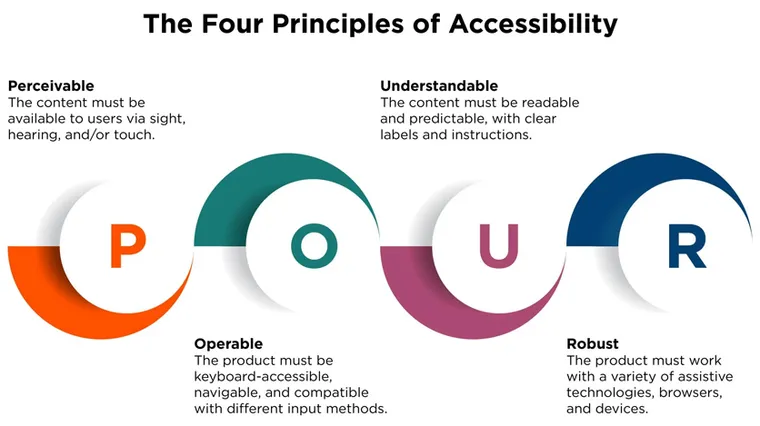
You can find the complete overview of the WCAG standard at Uutilsynet or explore the interactive WCAG Quick Reference at W3C. When it comes to text-to-speech and screen reader compatibility, the following principles are particularly relevant:
1. Text Alternatives for Non-Text Content
All images, graphics, and other visual elements must have descriptive alternative text (alt text) that can be read by screen readers. This is fundamental for visually impaired people to understand the content on a webpage. The requirements include:
- Informative images that convey important content must have descriptive alt text
- Complex diagrams and infographics require detailed descriptions
- Decorative images should be marked as such to avoid unnecessary reading
- Icons and buttons with functionality must have text describing the action
- Images of text should be avoided, but if used, the text must be reproduced in the alt attribute
2. Correct Semantic Structure
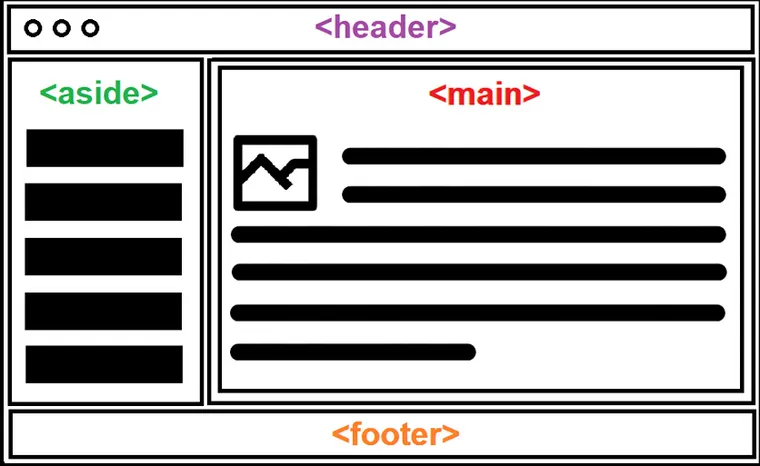
Webpages must be coded with proper HTML structure for screen readers to interpret and navigate the content effectively. This means that developers must be careful about how they structure the code:
- Headings must use correct HTML tags (h1-h6) in hierarchical order
- Lists must be marked as ordered or unordered lists
- Tables must have proper headers and relationships defined
- Navigation elements must be clearly marked with nav tags
- Main content must be marked with the main tag
- Page footer and header must use footer and header tags
3. Keyboard Navigation
All functionality must be accessible via keyboard, as many screen reader users navigate without a mouse. This is a fundamental principle for accessibility and requires thoughtful implementation:
- All interactive elements must be reachable with the tab key
- Focus indicators must be clear and have sufficient contrast
- Skip links to main content should be available as the first element
- Tab order must be logical and follow visual order
- Keyboard shortcuts must not collide with screen reader commands
- Modal dialogs must handle focus correctly
Implementing Screen Reader Support
To ensure that webpages work well with screen readers such as JAWS, NVDA, and VoiceOver, developers must follow best practices and test thoroughly throughout the development process. Here are the most important areas to focus on:
WAI-ARIA Implementation
ARIA (Accessible Rich Internet Applications) attributes provide additional information to assistive technology. Proper use of ARIA can significantly improve the user experience for screen reader users, but incorrect use can make things worse. W3C has extensive documentation on WAI-ARIA standards and guidelines. The following principles are important:
- Use
roleattributes to define the element's function when semantic HTML is not sufficient - Implement
aria-labelandaria-describedbyfor additional context - Mark dynamic content with
aria-liveregions for important updates - Use
aria-expandedfor elements that can be expanded/collapsed - Implement
aria-currentto indicate the current page in navigation - Avoid overriding semantic HTML with ARIA when not necessary
Testing With Screen Readers
Regular testing is crucial for ensuring quality. Testing should be an integrated part of the development process, not just something done at the end. Here is a systematic approach:
- Test with multiple screen readers (NVDA on Windows, VoiceOver on Mac/iOS, TalkBack on Android)
- Navigate using only the keyboard throughout the entire website
- Check that all information is available and understandable without visual context
- Verify that interactive elements are announced correctly with role and state
- Test with different reading speeds to ensure comprehensibility
- Include actual users with disabilities in the testing process
Practical Examples of Speech Synthesis Solutions
There are many different solutions for text to speech, from built-in system functions to dedicated tools. The choice depends on needs and technical skills. For WordPress websites we have built our own text to speech plugin with natural ElevenLabs voices. The player at the top of this article uses the same solution.
The numbers behind the plugin, as of September 2026: downloaded more than 27,000 times, 5 out of 5 stars on wordpress.org, latest version 3.3.30 released September 8, more than 600 voices in 90 languages. The free version needs no card. It runs on sites from Stanford University to Haymarket Media.
One honest limit: a read-aloud player does not replace a screen reader, and it does not repair a page that lacks alt text and headings. It helps people who can see the screen but read with difficulty. Screen reader users need the structure underneath.
For Webpages and Documents
Modern browsers and operating systems have built-in support for reading aloud that is continuously improving. The most commonly used solutions include:
- Windows: Narrator (built-in) and NVDA (free, open source)
- macOS/iOS: VoiceOver (built-in with extensive functionality)
- Android: TalkBack (built-in) and Voice Access
- Chrome/Edge: Built-in reading functions and extensions
- JAWS: Professional screen reader with advanced features
- Audio and Braille displays for combined auditory and tactile feedback
For Specialized Needs
Most countries have a library service for people who cannot read printed text. In the US it is the National Library Service of the Library of Congress. In Norway it is Tibi, with around 100,000 borrowers and its own Norwegian voices for Bokmål and Nynorsk. These services are free for people with a documented reading disability, and they show what good text to speech sounds like in a given language.
Common Challenges and Solutions
Implementing good screen reader support comes with several technical and design challenges. Here are the most common problems and how they can be solved:
Challenge 1: Complex Interactive Elements
Modern web applications often use JavaScript-based components that can be difficult for screen readers to interpret. Particularly challenging are custom-developed components that don't follow established patterns.
Solution: Use progressive enhancement and ensure that basic functionality works without JavaScript. Implement ARIA attributes correctly for dynamic elements. Test thoroughly with actual screen readers, not just automated tools. Consider using established component libraries that have good accessibility support built in.
Challenge 2: PDF Documents
PDF files are often problematic for screen readers if they are not properly tagged. Many PDFs are essentially images of text, completely inaccessible to assistive technology.
Solution: Use tools like Adobe Acrobat Pro to ensure that PDFs are semantically correctly tagged. Add heading structure, alternative text for images, and correct reading order. Always consider offering HTML alternatives for important documents. For forms, use interactive PDF fields that are accessible.
Challenge 3: Multimedia Content
Videos and audio clips require special adaptation to be accessible. This goes beyond just captioning and includes several aspects.
Solution:
- Provide captions for all video with audio, synchronized and accurate
- Create transcriptions for pure audio clips that can be read with a screen reader
- Provide audio description if you are a public organization. The requirement applies to video published on or after 1 February 2024
- Ensure that video players are accessible with keyboard controls
- Provide the ability to adjust playback speed
- Avoid autoplay that can disrupt screen reader use
Challenge 4: Multilingual Content
Screen readers need to know which language is being used for correct pronunciation. Incorrect language settings can make content incomprehensible.
Solution: Use the lang attribute consistently both at the document level and for text in languages other than the main language. For example: <span lang="en">“Hello world”</span> in a document whose main language is not English. This ensures that the screen reader switches to the correct voice and pronunciation.
Challenge 5: Dynamic Content and Single Page Applications
Modern frameworks like React, Vue, and Angular create challenges for screen readers when content changes dynamically without page loading.
Solution: Implement ARIA live regions for important updates. Handle focus correctly during route changes. Use announcements to inform about state changes. Test thoroughly with screen readers throughout the entire user journey.
The Future of Text-to-Speech Technology
Artificial intelligence is driving the development. The voices get more natural every year, and support for smaller languages keeps improving.
Voices get harder to tell from human speech every year, and abbreviations, numbers and dialects are read more accurately. What does not change is that the structure underneath has to be in place.
Support for smaller languages keeps improving too. Norway's National Library, for example, built NB-Whisper, a Norwegian speech-to-text model, so that Norwegian speakers get tools as good as English speakers. Accessible content also comes with a bonus: the structure that helps screen readers also helps AI models understand and cite your content. That is the core of AEO optimization.
Best Practices for Implementation
Successful implementation of text-to-speech support requires a complete approach. Here are concrete steps to get started:
1. Start With Basic Accessibility
- Conduct an accessibility audit of existing content
- Implement semantic HTML as a foundation
- Add missing alt texts to all informative images
- Check and correct the heading hierarchy
- Ensure sufficient color contrast (at least 4.5:1 for normal text)
2. Test Continuously
- Integrate accessibility testing in CI/CD pipeline
- Use automated tools like axe or WAVE
- Conduct manual tests with screen readers
- Include users with disabilities in user testing
- Document and follow up on found problems systematically
How We Did It on Our Own Website
When we built the new mementor.no in July 2026, accessibility was a requirement from the first sketch, not a layer on top. This is what we actually did:
- Text to speech on every post: 66 audio files produced with our own solution at launch, and new audio whenever a post is updated.
- Contrast, alt text and keyboard navigation are checked automatically before every publish. A missing alt text stops the build.
- Structure that works with a screen reader: one H1 per page, proper landmarks for header, nav, main and footer, and a lang attribute on every paragraph that switches language.
- Light and dark mode with contrast above 4.5:1 in both.
The whole build is in how we built the new Mementor. The point is not that we are done. The point is that it costs little when it is there from the start.
How Mementor Can Help You
We help you from assessment to finished solution, without complicating the process.
- Accessibility review: we test your website against the WCAG requirements and give you a concrete list of what needs fixing.
- Development that follows the requirements: we build websites and web solutions with semantic HTML, keyboard navigation and screen reader support from the start.
- Text to speech on your website: our WordPress plugin reads your posts aloud with natural voices.
- Ongoing maintenance: with a Service Level Agreement (SLA) we keep your website updated as the requirements change.
Frequently Asked Questions
What is text to speech?
Text to speech is technology that turns written text into speech with an artificial voice. It is also called speech synthesis. The technology is used in screen readers, in audio versions of articles and in aids for people with reading difficulties.
What is the difference between text to speech and a screen reader?
Text to speech is the voice itself that reads the text aloud. A screen reader is a program that conveys everything on the screen, such as menus, buttons and text. The screen reader uses text to speech to do the job. NVDA, VoiceOver and TalkBack are well-known screen readers.
Is WCAG legally required?
WCAG itself is a standard, not a law, but the laws point to it. The EU Accessibility Act, the US ADA rules and national regulations in countries like Norway all require WCAG conformance, usually at level AA. Building to WCAG 2.2 AA satisfies all of them.
What is WCAG?
WCAG stands for Web Content Accessibility Guidelines and is a set of international guidelines for accessible web content. The guidelines build on four principles: perceivable, operable, understandable and robust. Laws in the EU, the US and most other markets build on WCAG.
What are the new WCAG guidelines for 2026?
WCAG 2.2 is still the current version in 2026. It added nine success criteria in 2023, including target size, focus not obscured, consistent help and accessible authentication, and removed the parsing criterion. What changed in 2026 is enforcement: the EU Accessibility Act has applied since June 2025, and EN 301 549 is being updated toward WCAG 2.2.
Is WCAG 3.0 official?
No. WCAG 3.0 exists as a W3C working draft and has been for years. You cannot conform to it, and no law references it. Build to WCAG 2.2 AA and follow the 3.0 drafts out of interest, not obligation.
What does the EU Accessibility Act mean for businesses outside the EU?
If you sell goods or services to customers in the EU, the directive applies to you regardless of where your business is based. It has applied since June 28, 2025 and covers online stores, banking, ticketing and e-books, among others. The technical target is WCAG 2.1 AA via EN 301 549.
Conclusion
Accessibility is a legal requirement, but it is also the simplest way to reach more people. Follow WCAG 2.2 at level AA, build the structure right, and add text to speech on top. Then the content is accessible to everyone, regardless of ability.
Universal design is about more than legal requirements. It is about giving everyone equal opportunities to participate in the digital society. When we design for those with the greatest needs, we create better solutions for everyone.
Start with small steps: check that your images have good alt text, test your website with a screen reader, and gradually build up competence in the organization. Every improvement, no matter how small, makes a difference for someone.
Contact Mementor to get help implementing universal design and text-to-speech solutions on your website. We have the expertise and tools needed to create digital experiences that truly work for all users. Contact us today for a no-obligation conversation about how we can help you.