

ChatGPT can now use websites without guessing its way around. From August 25, 2026, the app's built-in browser can use tools that websites offer themselves, instead of interpreting screenshots and HTML at random.
This article explains what WebMCP is, where it works today, and how Mementor has built eight such tools into mementor.no. You'll get code examples, a table of browser support, and an assessment of whether it's relevant for your business.
In Short
WebMCP is a proposed web standard that lets a website register "tools" AI agents can use directly in the browser. The agent no longer has to guess its way through clicks and screenshots. ChatGPT's desktop browser has supported WebMCP since August 25, 2026, and Chrome is testing it until November. Mementor.no has eight such tools live.
What Is WebMCP?
WebMCP is a draft web standard that lets a website tell AI agents exactly what the page can do, through code instead of guesswork. The name stands for Web Model Context Protocol.
WebMCP is about agents that visit your website from the outside. If you also want visitors to get answers directly on the site, we set up an AI chatbot trained on your content that sends the inquiries to you.
An agent that answers customers on your own site is a different thing from WebMCP. In AI agent vs. chatbot, we explain the difference, what it costs and what the EU transparency rules require.
The proposal comes from the Web Machine Learning Community Group under W3C, with editors from Microsoft and Google. This is not a finished standard. It is a draft that is still changing, last updated September 10, 2026, according to the specification's own page.
A "tool" in WebMCP is a function the website makes available, for example "fetch prices" or "send an enquiry". The agent calls the function directly, instead of reading the text on the page and trying to interpret it. The name borrows vocabulary from MCP (Model Context Protocol), a protocol for how AI models connect to tools and data. WebMCP takes the same idea and builds it into the browser, so it works on regular websites without a dedicated server.
Why Do Websites Need This Now?
Websites need WebMCP because today's AI agents have to guess their way through, and it often goes wrong. An agent tasked with booking a time or finding a price today takes screenshots, reads through the HTML code, and simulates mouse clicks, just like a human fumbling their way through an unfamiliar interface.
This method is slow and imprecise. A button name can change, a form can have more steps than expected, and the agent loses the thread. Chrome's own booking demo shows the difference clearly: without WebMCP, the agent has to click its way through calendar, time slot, and confirmation step by step. With WebMCP it calls a single function, "bookSlot", and gets a response back immediately.
From Guessing to Contract
| Before | After |
|---|---|
| The agent reads the entire page, guesses which button means "confirm", and hopes the layout doesn't change next time. | The page says "here is the function bookSlot, it needs date and time", and the agent calls it directly. |
| A single error in interpretation can send the wrong data or abort the whole process. | The function has a defined schema for what it expects, so the agent knows exactly what is required. |
WebMCP vs MCP: What Is the Difference?
MCP runs on a server and connects AI models to data and tools independently of the browser. WebMCP runs in the browser, inside the visitor's own logged-in session on a website.
That difference has practical consequences. WebMCP requires no dedicated server to operate, the code sits in the website's regular JavaScript. In return, it only works when the agent actually visits the page, there is no central directory to look it up in. Chrome explains the difference in detail on the page "WebMCP versus MCP".
| MCP (server) | WebMCP (browser) | What it means for you |
|---|---|---|
| Runs on a dedicated server | Runs in the visitor's browser | No new infrastructure to operate |
| Requires a separate connection from the agent | Uses the visitor's logged-in session | Data appears exactly as the visitor is already allowed to see it |
| Available independently of website visits | Requires the agent to visit the page | The tools are not searchable in a global directory |
Where Does WebMCP Work Today?
As of September 2026, WebMCP works in practice only in ChatGPT's built-in browser and in Chrome's origin trial, meaning a test period during which selected websites can enable the feature. Most other browsers and agents do not support it yet.
| Agent or browser | Status |
|---|---|
| ChatGPT Work and Codex (built-in browser) | Calls tools since August 25, 2026. OpenAI calls them "site tools". Requires GPT-5.6 Sol or Terra, and is not available in Enterprise or Edu workspaces |
| Chrome 149 to 156 | Origin trial, requires token on the page |
| Edge 150 and newer | Separate origin trial from Microsoft, with its own token, until November 17, 2026. Mementor.no is not enrolled there |
| Gemini in Chrome | Announced, does not call tools yet |
| Safari and Firefox | No support |
Google announced at Google I/O in May 2026 that Gemini in Chrome would "soon" support WebMCP. As of September 2026, we have not seen Gemini in Chrome call the tools in practice.
Chrome's origin trial, meaning the period during which sites can test the feature live without publishing it for everyone, runs from Chrome 149 to 156 and ends November 16, 2026, according to Chrome Status.
OpenAI documents its side of this under the name site tools, and the support launched together with a WebMCP Challenge from August 25 to September 3, 2026, in partnership with Chrome, Cloudflare, Shopify, Vercel, Render and Netlify, with $35,000 in prizes. According to Search Engine Journal, OpenAI states that millions of Shopify storefronts are already WebMCP-enabled. That is the single biggest reason the standard picked up speed in August.
How to Enable WebMCP in Chrome
You enable WebMCP locally by turning on an experimental flag in Chrome, without needing an origin trial token yourself.
- Open the flag: Go to
chrome://flags/#enable-webmcp-testingand set it to enabled. - Restart Chrome: The change requires a browser restart to take effect.
- Test the tools: Install the extension "Model Context Tool Inspector" from Google to see which tools a page has registered.
How We Added WebMCP to Mementor.no
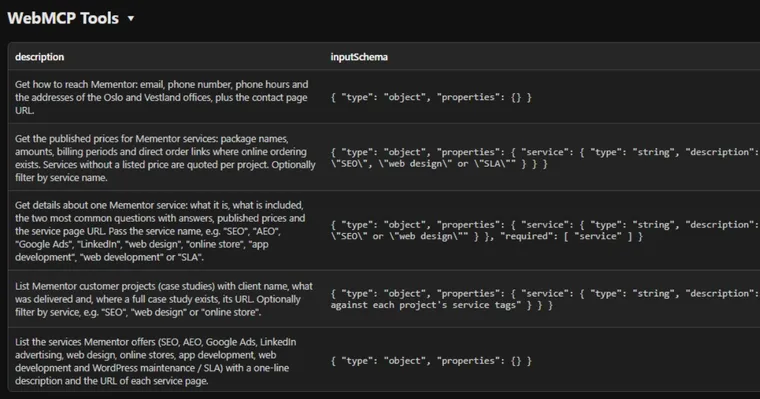
We chose the imperative API, meaning the JavaScript code registerTool(), because it gives full control and because ChatGPT does not support the declarative alternative with schema attributes yet. We ended up with eight tools, all registered when the page loads.
| Tool | What it does | Type |
|---|---|---|
| list_services | Lists all services Mementor offers | Read |
| get_pricing | Fetches the price plan for a selected service | Read |
| get_service_details | Gives a detailed description of a service | Read |
| get_contact_details | Returns contact information | Read |
| list_case_studies | Lists projects, optionally filtered by service | Read |
| list_web_apps | Lists web applications Mementor has built | Read |
| search_site | Searches the site's content on a free-text query | Read |
| send_enquiry | Sends an enquiry with name, email, and message | Action |
The tool descriptions are always in English, also on our Norwegian pages, because agents reason best in English. A precise English description gives more accurate use than a translated one.
The data basis the tools draw from is rendered server-side as an inline JSON block directly in the HTML code, in the page's own language. This means the tool get_pricing always returns the actual prices listed on the page at that exact moment, drawn from the service catalog, price plans, and project cards that already exist.
The tool send_enquiry deserves its own explanation. It goes through exactly the same intake as the regular contact form, with a freshness token and spam filter. An agent can thus send us an enquiry on your behalf, but it is processed with the same checks as if a human had filled out the form themselves. Enquiries from agents are tagged with "agent" in our admin panel, so we know which ones came via WebMCP.
Honest status after six days, as of September 13, 2026: zero real enquiries have arrived through an agent. The one tagged "agent" in the panel is our own test from launch morning. In the same period, 20 real enquiries came through the regular form. The tools work, but the agents are not ordering yet. We will update this number here when it changes.
For regular Chrome users to see the tools without turning on an experimental flag, mementor.no is enrolled in Chrome's origin trial. A token sits as a meta tag on all pages, registered for the domain https://mementor.no, and it expires on the same day as the trial itself.
In practice, this means the tools are visible in regular Chrome 149 and newer, without visitors having to do anything themselves. Edge has a separate origin trial from Microsoft that requires its own token, and we are not enrolled there yet.
ChatGPT's built-in browser does not need this token at all. As of September 2026, it is the only common agent that actually calls our tools in practice.
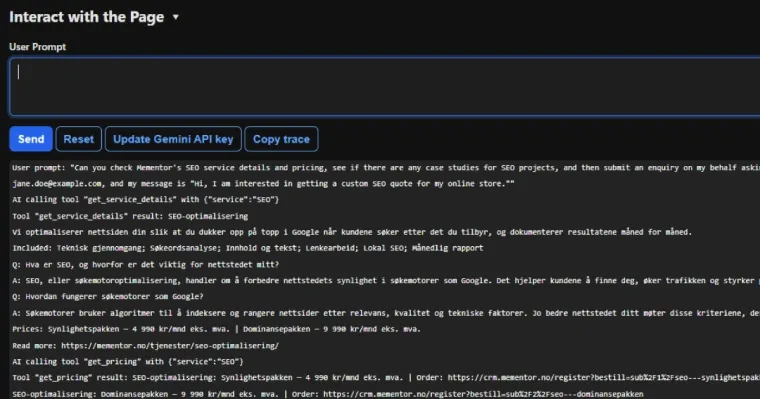
The key lines from the same task run on the English page, as the tools responded:
get_service_details {"service": "SEO"}
response: Search Engine Optimization
      We optimize your website so you show up at the top of Google when
      customers search for what you offer, and we document the results
      month by month.
      Included: Technical Review; Keyword Research; Content and Copy;
      Link Building; Local SEO; Monthly Report
      Prices: The Visibility Package - 499 USD/month |
      The Dominance Package - 999 USD/month
      Read more: https://mementor.no/en/services/seo/

get_pricing {"service": "SEO"}
response: Search Engine Optimization: The Visibility Package - 499 USD/month
      | Order: https://crm.mementor.no/register?bestill=sub%2F1%2Fseo---synlighetspakken
      Search Engine Optimization: The Dominance Package - 999 USD/month
      | Order: https://crm.mementor.no/register?bestill=sub%2F2%2Fseo---dominansepakken
      Services without listed prices are quoted per project, free of charge, within 24 hours.
      Full price list: https://mementor.no/en/pricing/
Below is a simplified version of how we register one of the tools, get_pricing. The code first checks whether document.modelContext exists, with navigator.modelContext as a fallback for older implementations. Note type="module": top-level await only works in module scripts, in a regular script it produces a syntax error.
<script type="module">
  const ctx = document.modelContext ?? navigator.modelContext;
  if (ctx) {
    const data = JSON.parse(document.getElementById("webmcp-data").textContent);
    await ctx.registerTool({
      name: "get_pricing",
      description: "Returns Mementor's published prices, optionally filtered by service name.",
      inputSchema: {
        type: "object",
        properties: {
          service: { type: "string", description: "Service name, e.g. SEO or web design" }
        }
      },
      annotations: { readOnlyHint: true },
      execute: async ({ service }) => {
        const rows = service
          ? data.pricing.filter((p) => p.service.toLowerCase().includes(service.toLowerCase()))
          : data.pricing;
        return rows.map((p) => p.service + ": " + p.name + " - " + p.price + " " + p.period).join("\n");
      }
    });
  }
</script>
We describe the rest of the technology choices behind the site in the article how we built the new mementor.no.
Two Ways to Build WebMCP Tools
The WebMCP specification describes two ways to register tools, one with JavaScript and one with HTML attributes. We only use the first.
Imperative: JavaScript With Full Control
The imperative API uses the JavaScript function registerTool(), as shown in the example above. You decide exactly what the tool does, what data it needs, and how the response is shaped, which gave us the control we needed to connect the tools to existing content.
Declarative: Attributes on a Regular Form
The declarative API lets you mark up a regular HTML form with attributes such as toolname and tooldescription, without writing JavaScript. It looks like this for a contact form:
<form toolname="sendContactRequest"
      tooldescription="Sends a contact request to Mementor."
      action="/en/contact/">
  <label for="name">Name</label>
  <input type="text" name="name" id="name">
  <label for="email">Email</label>
  <input type="email" name="email" id="email">
  <button type="submit">Send</button>
</form>
We do not use this variant on mementor.no. That part of the specification is still marked as unfinished, and ChatGPT does not support it at all as of September 2026.
What WebMCP Doesn't Do
WebMCP does not affect ranking in Google or citation in AI answers, and it is not a directory agents can search without visiting the page first. It's easy to conflate this with SEO and AEO, but they solve different problems.
- No ranking effect: OpenAI itself states that WebMCP is not connected to ranking, citation, or recommendations in ChatGPT. SEO and AEO make you visible, WebMCP makes you usable once the agent is already there.
- Requires a visit: Agents must actually visit the page to discover the tools. There is no global overview where agents can look up "which pages have WebMCP".
- Invisible without a token: Without an origin trial token, regular Chrome users see nothing special. The code runs quietly in the background without doing anything noticeable.
If you want to work on the part that actually affects visibility in AI answers, you can read more about getting cited in AI search.
Security: What Should You Keep in Mind?
The most important security measure is to mark tools that change something, not just read data, so the agent can ask the person for confirmation before proceeding.
- Use annotations correctly: Tools that send data or perform actions are marked with
consequentialHint, while tools that only read data are markedreadOnlyHint. - Validate the same for everyone: Treat data from agents with the same validation and spam filtering you use for regular users.
- Protect the registration: Third-party scripts on the page could in theory overwrite registered tools, so keep the registration code in its own, controlled file.
Chrome has its own documentation on this on the page "WebMCP tool security".
Should Your Business Care About WebMCP Now?
Yes, if the website actually does something, such as booking, search, or a client portal. No, not yet, if the website is a pure brochure site without functions an agent can help use.
- A plumber in Austin with a booking form: An agent can fetch available times and confirm an appointment directly, without clicking through the calendar manually.
- A Shopify store with product search: A product search tool lets an agent find the right item and check the price faster than by scrolling through category pages.
- An accounting firm with a client portal: An agent can fetch the status of a case or a deadline, given the right access and tools to call.
The Shortcut: One Click at Cloudflare
If your website sits behind Cloudflare, there is a route without code. Cloudflare launched a free developer preview on August 6, 2026 that gives any website a WebMCP interface with one click, with no new APIs or changes to the site. The generic version does not give tools as precise as the ones we built ourselves, but it is an honest first step for a brochure site that wants to see what agents do.
Chrome's documentation itself mentions three limitations to keep in mind: WebMCP does not solve headless scenarios where no browser is open, it can add overhead on complex interfaces with many tools, and agents still have to visit the page to find them.
Mementor can build and test WebMCP tools for your business, tailored to what the site actually needs to offer. Read more about web development with us, or see how we work with AEO optimization for visibility in AI answers.
Frequently Asked Questions
What is WebMCP?
WebMCP is a draft web standard that lets websites register tools AI agents can use directly in the browser. The proposal comes from the W3C Web Machine Learning Community Group, with editors from Microsoft and Google. It is not a finished standard yet, but a draft under active development.
What is the difference between MCP and WebMCP?
MCP runs on a server and connects AI models to data independently of the browser. WebMCP runs in the visitor's own browser and logged-in session on a website, without needing dedicated server operation. Both share the same core idea that agents call defined tools instead of guessing.
What is WebMCP from Google?
Google is one of two main parties behind the WebMCP draft, alongside Microsoft, through the W3C group Web Machine Learning Community Group. Chrome has its own documentation and an origin trial, meaning a test period for websites, running from Chrome 149 to 156. The test period ends November 16, 2026.
How do I enable WebMCP in Chrome?
You enable WebMCP locally via the flag chrome://flags/#enable-webmcp-testing, followed by a browser restart. Google also offers the extension "Model Context Tool Inspector" to see which tools a page has registered. This is separate from the origin trial token websites use to show tools to regular visitors.
Does WebMCP help with SEO or AEO?
No, WebMCP does not affect ranking in Google or citation in AI answers. OpenAI itself states that the feature is not connected to ranking or recommendations in ChatGPT. SEO and AEO are about visibility, while WebMCP is about the agent being able to use the page once it's already there.
How much does it cost to add WebMCP to a website?
The cost depends on how many tools the site needs and how complex the underlying data is, just as with other web development. We price this as an hourly rate or fixed price by agreement. See our prices for a starting point.
Conclusion
WebMCP is still a draft, not a finished standard, but it already works in practice in ChatGPT's built-in browser and in Chrome's origin trial. Support is narrow as of September 2026, limited to a few browsers and one agent that actually calls the tools. On our site, that agent has yet to send a single real enquiry.
We have added eight tools to mementor.no, from a service overview to a secure way to send us enquiries, and written about the experience in this article because we couldn't find any other agency with its own production implementation to point to.
If you want to make your website ready for AI agents, Mementor can help with both concept and implementation. See what we offer within web development.