

SEO does not have to be hard. As a beginner you get far with three things: find the words your customers search with, create content that answers well, and make sure your website is fast and tidy. This tutorial shows you how to learn SEO step by step.
You need no technical background. We explain the terms simply, show you free tools and give you a concrete plan for the first 30 days. The guide is updated for 2026 and also covers how AI answers in Google are changing search.
It draws on over 25 years of SEO work for clients, and on the more than 1,500 analyses our tool SEO-Analyse.no has run so far in 2026.
In Short
What You Will Learn in This Post
- What SEO is, and the most important terms explained simply
- How to find keywords with free tools
- On-page and off-page SEO without jargon
- How Google judges quality with E-E-A-T
- What AI search means for you, and why the groundwork still applies
- A concrete 30-day plan you can start today
SEO for Dummies: The Whole Guide in Five Sentences
Find out what your customers type into Google. Write one page per search that answers it better than what ranks today. Make the page fast and easy to read on a phone. Get a few credible websites to link to you. Measure in Search Console, and repeat every month.
That is SEO. The rest of this tutorial explains each sentence.
SEO Basics: The Terms You Need to Know
SEO stands for search engine optimization: the work of making your website visible in Google and other search engines without paying for ads. Five terms cover most of what you need as a beginner: keywords, backlinks, meta descriptions, ranking, and AEO. Learn these first, and the rest of this guide becomes much easier to follow.
What Are Keywords?
Keywords are the words and phrases people type into search engines when they look for information, products, or services. If someone searches for "how to create a blog," that whole phrase is the keyword. Using relevant keywords in your content helps search engines understand what your page is about.
Do this: write down five phrases you would type to find a business like yours. Those are your first keywords.
What Are Backlinks?
Backlinks are links from other websites that point to yours. Each one works like a recommendation and helps search engines judge how credible your website is. If an established blog in your industry links to your article, Google reads it as a sign that your content is worth showing.
What Are Meta Descriptions?
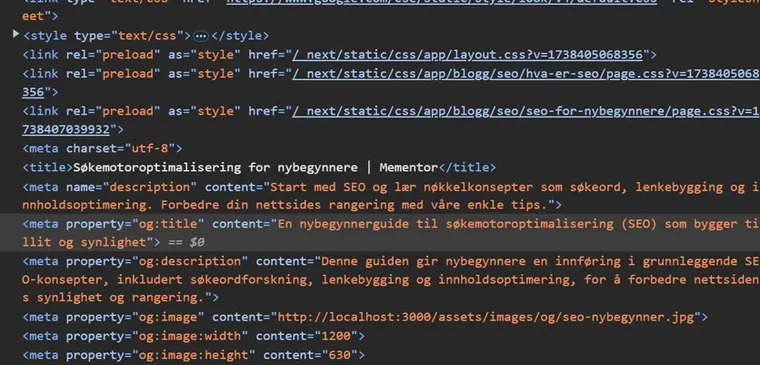
A meta description is the short text that appears below the title in search results. It tells people what the page is about and whether it answers their search. Keep it under 155 characters, and write it like a promise about what the reader will get.
What Is Search Engine Ranking?
Ranking is the position your page holds in the search results for a given keyword. The higher you rank, the more visible you are, and the more clicks you get. Most SEO work comes down to improving this position on the searches that matter to you.
What Is AEO?
AEO stands for Answer Engine Optimization and is about getting cited in AI answers, such as Google's AI Overviews and ChatGPT. SEO and AEO build on the same foundation: clear content that answers what people actually wonder about. Read more in our guide about AEO optimization.
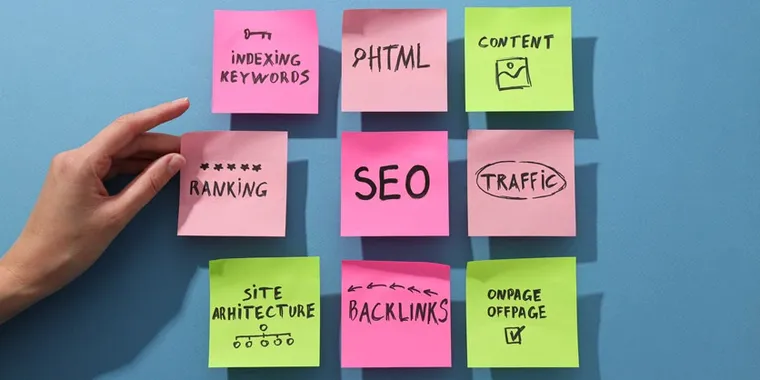
Once these terms feel familiar, you have the vocabulary to work through every step that follows.
How to Do Keyword Research as a Beginner
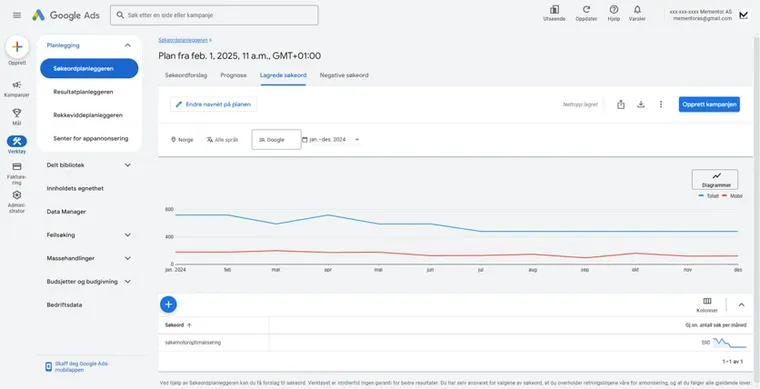
Keyword research means finding the words your customers actually type into Google, then choosing the ones you can realistically rank for. As a beginner, start with specific, low-competition phrases instead of broad terms. The free tools are enough for the first months. We also have a separate guide showing how to do keyword research step by step.
Tools for Keyword Research
These tools help you see what people search for and how hard each keyword is to rank for:
- Google Keyword Planner: a free tool that shows search volume and competition for specific keywords.
- Moz Keyword Explorer: shows volume, difficulty, and related keyword suggestions, with a free monthly quota.
- Ahrefs: a paid all-round SEO tool with detailed data on keywords, backlinks, and competitors.
- SEMrush: a paid alternative to Ahrefs with keyword analysis, competitor overviews, and more.
How to Choose the Best Keywords
Weigh two things against each other: relevance and competition.
- Relevance: the keyword should match what your customer wants at that moment. If you sell shoes, "buy running shoes" brings buyers, while "shoe history" brings readers.
- Low competition: as a beginner, pick keywords with lower competition and reasonable volume. Ranking for ten small searches beats losing on one big one.
- Long-tail keywords: longer, specific phrases like "how to choose running shoes for asphalt" have less competition and visitors who are closer to a decision.
Do this: pick three specific phrases your customers use, and plan one page for each that answers the search better than what ranks today. If you run a local business, include place names, and read our guide about local SEO.
On-Page SEO: Optimize Your Website for Search Engines and Users
On-page SEO covers everything you control on your own pages: titles, meta descriptions, headings, URLs, internal links, and images. Done well, it helps search engines understand your content and gives visitors a faster, clearer page. For most beginners, this is where the first visible results come from. Much of the groundwork sits in how the website is built.
Title Tags
The title tag is the clickable headline in the search results, and one of the strongest on-page signals. A good title tag:
- stays between 50 and 60 characters,
- places the most important keyword early,
- gives a concrete reason to click.
Meta Descriptions
The meta description is your ad text in the search results. Keep it under 155 characters, include the keyword naturally, and describe what the reader gets on the page. Our guide on SEO writing shows how to write titles, descriptions, and body text that work together.
Headings (H1, H2, H3)
Headings show search engines and readers how your page is structured. Use one H1 for the main heading, and H2 and H3 for the sections below it. Clear headings also make your content easier for AI engines to quote.
URL Structure
A good URL is short, descriptive, and readable. Use example.com/how-to-optimize-seo rather than example.com/?p=123. Avoid long strings of numbers and parameters.
Internal Linking
Internal links connect the pages on your website. They help search engines find and understand your content, and they guide visitors to related information. Link from your blog posts to your service pages, and between articles on the same topic.
Image Optimization
Images affect both speed and visibility:
- Use descriptive file names (e.g.
how-to-optimize-seo.jpg). - Add alt text that describes what the image shows.
- Compress images so they load fast without visible quality loss.
Do this: open your five most important pages, and rewrite the title and meta description on each so they match what people actually search for. It is the fastest on-page win available.
Our own example: our 15 SEO tips page was shown 658,000 times in Google in 90 days, at an average position of 11, and only 1.3 percent clicked. The content was fine. The title promised nothing specific, so we rewrote it in September 2026.
Off-Page SEO: Build Authority With Backlinks and External Signals
Off-page SEO is everything that happens outside your own website, and links from other websites matter most. Search engines read each link as a recommendation. A handful of links from credible, relevant websites lifts your rankings more than dozens of weak ones. Quality beats quantity, every time.
What Are Backlinks, and Why Are They Important?
Backlinks work like votes of confidence. When a website your industry trusts links to your content, Google takes it as a signal that your page is worth recommending. The effect depends on who links to you: one link from a respected trade publication outweighs many links from unknown pages.
How to Build Backlinks
Earning links takes patience, but the methods are simple:
- Guest articles: write for other websites in your field, with a link back to your own.
- Collaboration: create content together with partners, bloggers, or industry organizations that both sides want to share.
- Content worth citing: thorough guides, original numbers, and practical tools attract links on their own.
- Content marketing: share your work in social media and newsletters so the right people see it and can link to it.
One clear warning: never buy links from link networks. Google is good at spotting paid link schemes, and a penalty can undo months of honest work. If a link costs money and exists only for SEO, it will hurt you more than it helps.
Do this: list five partners, suppliers, or industry associations that could naturally mention your business, and contact one of them this week.

How to Check Backlinks to Your Website
Use these tools to see who links to you:
- Google Search Console: free, and shows the most important links Google has found.
- Ahrefs: detailed link data, including which links your competitors have.
- SEMrush: link analysis as part of a wider SEO toolkit.
E-E-A-T: How Google Evaluates the Quality of Your Content
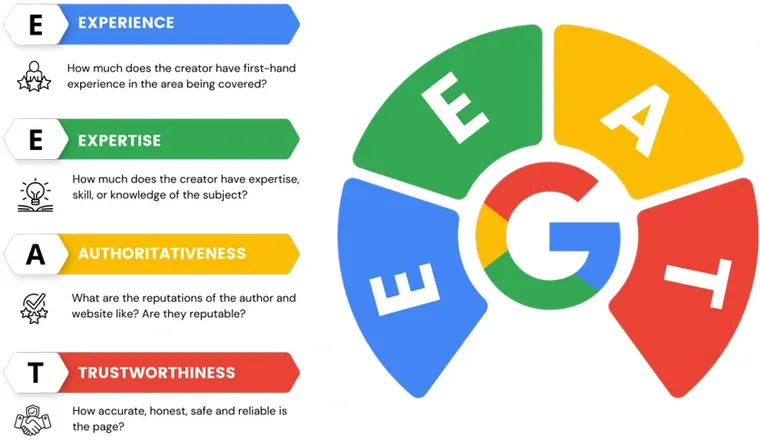
E-E-A-T stands for Experience, Expertise, Authoritativeness, and Trustworthiness. Google uses it to judge whether your content deserves trust, especially for topics that affect health, money, or safety. You strengthen it by showing openly who writes your content, and what qualifies them to do so.
Experience became its own factor in 2022 and refers to first-hand experience with the topic: you have used the product, run the process, or made the mistakes yourself. Anonymous content without a visible author loses to content with a real expert behind it.
Do this:
- Put a byline with your name and role on every article you publish.
- Create an author page with your background, and link every byline to it.
- Write in first person about your own experiences: what you tested, what happened, and what you learned.
- Show customer reviews where they support the content, for example next to your services.
How E-E-A-T Affects SEO
E-E-A-T is not a direct ranking factor, but it shapes how Google's quality systems assess your pages. Content that shows real expertise and a trustworthy sender ranks more easily, and the effect is strongest in competitive industries and in topics where wrong information causes real harm.
SEO in 2026: AI Search Is Changing Search
Google now shows AI answers directly in the search results. AI Overviews arrived in Norway in May 2025. In the autumn of 2025, AI Mode followed, a separate tab where you can ask long questions and get combined answers with source references.
What does this mean for you as an SEO beginner? Two things:
- Fewer clicks on informational searches: measurements from Ahrefs show 58 percent lower click-through rate on the first position when an AI answer is shown, across 300,000 keywords in December 2025. The numbers vary between industries, so use them as an indication.
- Purchase searches are less affected: if someone searches for "plumber Bergen" or "buy running shoes", they still have to click through to a website.
The good news is that the AI answers are built on regular websites. The pages that get cited are the same pages that follow the advice in this guide. Clear answers, tidy structure and real expertise work both in Google and in AI answers.
The work of getting cited in AI answers is called AEO. If you want your business to be the answer when customers ask an AI, read about our AEO services.
Get Started: A Simple Plan for the First 30 Days
You do not have to do everything at once. This plan gives you a calm start with one task per week.
| Week | Focus | Tasks | Tools |
|---|---|---|---|
| 1 | Get an overview | Set up Google Search Console and Google Analytics. Search "site:yourdomain.com" and check that your most important pages are indexed. Test your front page speed, and run our step-by-step SEO analysis. | Google Search Console, Google Analytics, PageSpeed Insights, SEO Analysis (runs over 30 technical SEO checks for free) |
| 2 | Find the keywords | Make a list of 10 to 20 keywords your customers use. Check search volume, and choose low-competition words first. | Google Keyword Planner, Moz Keyword Explorer |
| 3 | Tidy up your pages | Write new titles and meta descriptions for your five most important pages. Check that every page has one H1 and tidy subheadings. Add alt text to your images. | Google Search Console, your CMS |
| 4 | Create content and links | Write one thorough article answering a question your customers often ask. Link internally between pages about the same topic. Ask a partner or industry association for a link. | Your CMS, email |
After 30 days the foundation is in place. Repeat weeks 2 to 4 every month, and you build visibility step by step. That groundwork is what gave Stas Artist 199 percent more new users from organic search in the first seven months after we rebuilt the website. Once the foundation is in place, continue with our 15 SEO tips, where every tip comes with a concrete next step.
How Mementor Can Help You
If you would rather spend your time on your customers, we take the SEO job off your hands.
- SEO as a fixed monthly package: we do the whole job, from technical cleanup to content and links. See our SEO packages with prices.
- Norwegian SEO agency with long experience: read more about how we work with SEO for businesses across Norway.
- Visible in AI answers: with AEO we make sure your business gets cited when customers ask ChatGPT or Google.
- Free testing tool: check your website yourself with SEO Analysis.
Frequently Asked Questions
What is SEO?
SEO stands for search engine optimization. It is the work of making your website visible in Google and other search engines, without paying for ads. Read more in our guide about what SEO is.
How long does it take before SEO works?
Expect four months to a year before you see clear results. That is Google's own estimate. The time depends on the competition, the age of your website and how much work you put in.
Can I do SEO myself?
Yes. You can handle the basics yourself with free tools like Google Search Console. Set aside a little time each week and follow the 30-day plan in this guide. If you get stuck on technical errors, an agency can help you further.
How do I start with SEO as a beginner?
Start with three things: set up Google Search Console, check that your most important pages are indexed, and write titles and meta descriptions that match real searches. Then follow the 30-day plan above, one task per week. The free tools from Google are enough at this stage.
Is SEO hard to learn?
No. You can learn the basics in a few weeks with free tools, and this guide covers the whole foundation. What takes time is the results: expect months, not days. Technical troubleshooting and link building are harder, and that is where an agency can take over.
What does SEO cost?
Norwegian agencies typically charge $90 to $200 per hour. Ongoing agreements usually run from $500 to $4,000 per month, depending on competition and scope. At Mementor, the Visibility package starts at $499 per month, with no lock-in period.
Can I learn SEO by myself?
Yes. Everything in this tutorial can be done with free tools and a few hours a week. Learn by doing it on your own website: pick one page, improve the title, watch Search Console for four weeks, and repeat. You will learn more from one real page than from ten courses.
How can a beginner learn SEO?
In this order: understand the five terms above, find ten keywords your customers use, fix titles and meta descriptions on your five most important pages, then write one thorough article a month. Google's own SEO Starter Guide is the best free reference alongside this tutorial.
Is SEO still worth it now that Google answers with AI?
Yes. The AI answers in Google are built on regular search results, and the sources that get cited are pages with solid SEO work underneath. Good SEO is therefore also your ticket into the AI answers.
Conclusion: Your Beginner's Guide to SEO in Short
SEO is an ongoing process that requires time, patience, and consistency. There is no quick fix, but by understanding the basic principles and implementing them, you can gradually improve your website's visibility and attract more organic traffic.
Remember that search engines such as Google are constantly updating their algorithms, so it is important to stay up to date on best practices in SEO. Continue to learn, test, and adapt your strategy based on results and changes in how people search.
If you are a beginner, start by optimizing the simple elements of your website, such as title tags, meta descriptions, and content structure. Then you can gradually expand your SEO strategy to include more advanced techniques such as link building and technical SEO. With time and effort, you will see improvements in your website's ranking and traffic.
Need Help With SEO?
At Mementor, we have extensive experience in search engine optimization and can help you improve the visibility of your website. Contact us for a no-obligation chat!