


Are your competitors ranking above you in Google? An SEO audit tells you why. It shows what works on your website, and what holds it back.
This guide walks through the audit in seven steps, with a 25-point checklist you can tick off as you go. The tools are free.
Our own checker, SEO-Analyse.no, has run more than 1,500 analyses so far in 2026. The checklist below is the same one we work through for clients, in the same order.
In Short
An SEO audit, also called an SEO analysis, is a review of your website. It shows what's preventing you from becoming visible in Google and AI search. You check technical aspects, content, links, and user experience. Then you fix the issues in order of priority. Free tools like Google Search Console and PageSpeed Insights cover most of it.
What Is an SEO Audit?
An SEO audit, often called an SEO analysis, is a systematic check of how well your website performs in search engines. The analysis covers four main areas: technology, content, links, and user experience.
The goal is simple. You need to find the errors that cost you visibility, and the opportunities your competitors haven't spotted. Are you completely new to the topic? Then start by reading about what SEO is or take a look at our guide for SEO beginners.
In 2026, the analysis is about more than Google. Services like ChatGPT, Gemini, and Google's own AI answers pull information from websites and give the person searching the answer directly. A modern SEO analysis therefore also checks how visible you are in these answers. More on that in step 7.
The SEO Audit Checklist: 25 Points in 7 Steps
Print this, or keep it open in a tab. Each step below explains how to check the points and which tool to use.
1. Technical
- The important pages are indexed. Check the "Pages" report in Google Search Console.
- robots.txt blocks nothing that should be found.
- The XML sitemap is current and submitted in Search Console.
- No broken links or 404 errors on the site.
- Core Web Vitals pass: LCP under 2.5 seconds, INP under 200 ms, CLS under 0.1.
- The whole site runs on HTTPS, and http addresses redirect.
2. On-Page
- Every important page has a unique title under 60 characters, with the keyword early.
- Meta descriptions are around 150 characters and give a reason to click.
- One H1 per page, with H2 and H3 in a logical order.
- The keyword appears naturally in the title, first paragraph and some headings.
- No thin or duplicate pages.
3. User Experience
- The page passes on mobile in PageSpeed Insights.
- Images are compressed, in WebP, and lazy loaded below the fold.
- Important pages are at most three clicks from the home page, with at least one internal link each.
4. Links
- The backlink profile is reviewed in Ahrefs or Semrush, and toxic links are noted.
- Anchor texts vary and describe the target page.
- Competitors' link sources are listed as targets.
5. Keywords
- Each important page has one primary keyword.
- No two pages compete for the same keyword.
- Long-tail queries from Search Console are mapped to pages.
6. Competitors
- The top three competitors for each key search are analyzed.
- Content gaps are listed as a plan.
7. AI Visibility
- robots.txt allows OAI-SearchBot, PerplexityBot and Claude-SearchBot.
- Key pages answer the question first and carry FAQ or article schema.
- Your brand is tested in ChatGPT, Gemini and Google's AI answers for the questions customers ask.
Step 1: Check Technical SEO
Technology is the foundation. If the site has technical errors, good content won't help. This step takes about an hour with free tools. The technical points in the checklist have their own 14-point guide.
Crawling and Indexing
Google must be able to read your pages and store them in its index. This is called crawling and indexing. Google Search Console shows which pages Google has indexed, and which ones have issues. A tool like Screaming Frog finds broken links, blocked pages, and missing titles.
Check these points:
- Are the important pages indexed? See the "Pages" report in Search Console.
- Is robots.txt blocking anything it shouldn't?
- Do you have an updated XML sitemap?
- Are there broken links on the site?
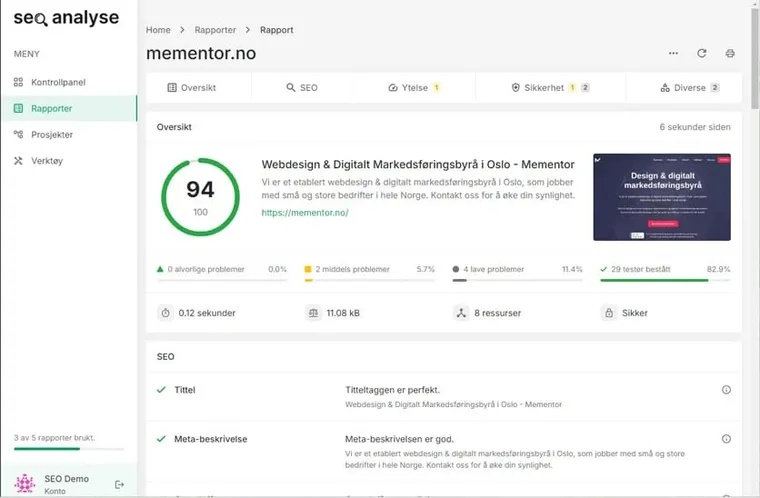
Want a quick technical review? SEO-Analyse.no, our free SEO checker, runs more than 30 tests on your website. We built the tool ourselves at Mementor, and it has run more than 1,500 analyses so far in 2026. The SEO audit in our Broken Link Checker completed more than 500 in August 2026 alone. If you are rebuilding from scratch, it is worth reading what makes an SEO-friendly website.
Core Web Vitals
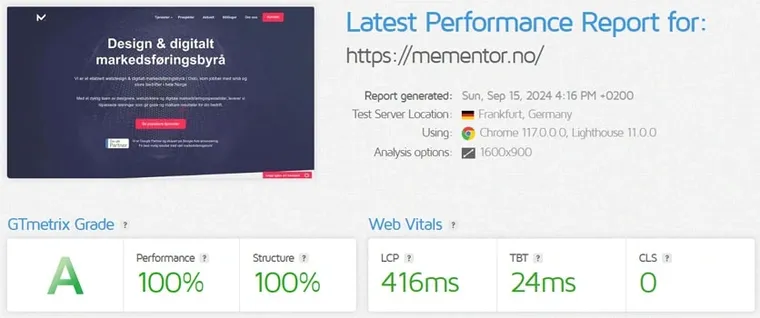
Core Web Vitals are Google's measure of user experience, and they count toward ranking. Three values apply in 2026:
- LCP (Largest Contentful Paint) measures how quickly the main content appears. A good value is under 2.5 seconds.
- INP (Interaction to Next Paint) measures how quickly the page responds when a visitor clicks or types. A good value is under 200 milliseconds. INP replaced the old FID metric in March 2024.
- CLS (Cumulative Layout Shift) measures whether the content jumps around while the page loads. A good value is under 0.1.
Measure the values with PageSpeed Insights or GTmetrix. Search Console also has a dedicated Core Web Vitals report with real user data.
Security and HTTPS
The entire website should run on HTTPS. This protects users and is a ranking signal for Google. Check that the SSL certificate is valid, and that old http addresses redirect to https.
Step 2: On-Page SEO Analysis of Your Content
This step takes one to two hours, depending on how many pages you review. Start with the pages that matter most for sales.
Titles and Meta Descriptions
The title is the first thing people see in the search result. It should include the keyword and be under about 60 characters. The meta description should be around 150 characters and give people a reason to click.
Example of a good title: "SEO Services for Small Businesses." It's short and clear, and the keyword comes early.
Example of a good meta description: "Want more customers from Google? We help small businesses rank higher. Request a free assessment today." It explains the value and tells the reader what to do.
Headings
Use one H1 per page. Divide the rest of the content with H2s and H3s. This helps both readers and search engines understand the structure. Write headings that answer what people are actually searching for.
Keywords in the Text
Use the keyword naturally in the title, in the first paragraph, and in some headings. Forget old rules about keyword density in percentages. Google has no ideal density, and too many repetitions can do more harm than good.
Instead, use words that naturally belong to the topic. If you're writing about SEO analysis, words like indexing, keywords, and ranking belong with it. Want to get better at this? Read our SEO writing guide.
Step 3: Assess the User Experience
This step takes about 30 minutes with free tools.
Mobile First
Google uses the mobile version of your website when ranking you. This is called mobile-first indexing. The site must therefore work just as well on mobile as on a PC.
Google's old mobile-friendly test was discontinued in December 2023 and no longer exists. Instead, use PageSpeed Insights or Lighthouse in your browser. There you can see how the page performs on mobile. A mobile-friendly web design leads to longer visits and more inquiries.

Speed
Slow pages lose visitors. Many people leave the page before it finishes loading. Common culprits are large images, heavy scripts, and slow servers. PageSpeed Insights tells you what's slowing down your page. Fast WordPress hosting close to your visitors also cuts loading time.
Structure and Navigation
Important pages should be a maximum of three clicks from the homepage. A logical menu and good internal links help both users and search engines. Check that each important page has at least one internal link pointing to it.
Step 4: Analyze Your Links
This step takes 30 to 60 minutes with a link tool like Ahrefs or Semrush.
External Links (Backlinks)
Links from other websites act as recommendations. Quality beats quantity. One link from a well-known industry site is worth more than a hundred links from weak sites.
Tools like Ahrefs and Semrush show who links to you. Ahrefs uses the Domain Rating (DR) metric, and Semrush uses Authority Score. Both give an indication of how strong your links are.
Anchor Texts
The anchor text is the clickable text in a link. It should describe the page the link points to. Vary the texts. If all links use exactly the same keyword, it can look manipulated to Google.
Competitors' Links
Check where your competitors get their links from. Use Ahrefs or Semrush to see their link profile. You'll often find directories, blogs, and media outlets that could link to you too. Working toward a local market? Then local SEO often provides the easiest links, for example from local directories and newspapers.
Step 5: Do a Keyword Analysis
This step takes one to two hours the first time. It goes faster once you know your keywords.
Find the Right Keywords
You need to know what your customers are actually typing into the search field. Google's Keyword Planner shows search volume and competition for free. Ahrefs and Semrush provide deeper numbers and show your competitors' keywords.
Look especially for long and specific searches. "SEO analysis of an online store" has fewer searches than "SEO," but those searching that way are much closer to a decision. You find the full walkthrough of the keyword research process in our dedicated guide.
Avoid Pages Competing With Each Other
If you have several pages on the same topic, they can compete for the same keyword. This is called cannibalization. Then Google doesn't know which page to show, and all the pages lose out. The solution is to merge the pages or give each one a distinct topic. Give each important keyword one dedicated page.
We had this problem ourselves. This guide and our tool page competed for "seo analysis" in the U.S. In the 90 days before this update, the guide was shown 33,000 times at an average position of 44 and got three clicks, while the tool page took the query itself. So we split the job: the tool page owns "free SEO analysis", and this guide owns the audit checklist.
That is the whole fix.
Step 6: Analyze the Competitors
This step takes about an hour for your three closest competitors. Search for your most important keywords, and see who ranks at the top. Then analyze their pages. What do they write about? How thorough is the content? Where do they get links from?
A gap analysis shows topics competitors cover that you're missing. Ahrefs and Semrush have dedicated features for this. Once you've listed the gaps, you have your content plan for the coming months. Need concrete ideas for action? You'll find more in our 15 SEO tips.
Step 7: Check Your Visibility in AI Search
This step was missing from older SEO analyses. In 2026, it has become an important part. It takes about 30 minutes of manual testing.
Google shows AI-generated answers at the top of many searches. Conductor's 2026 benchmarks report, based on 21.9 million searches, found an AI Overview in one of four. Pew Research Center measured that people click a regular result 8 percent of the time when an AI summary is shown, against 15 percent when it is not. In addition, more and more people ask ChatGPT, Gemini, and Perplexity directly instead of googling.
The work of becoming visible in these answers is called AEO, Answer Engine Optimization. Include these points in the analysis:
- Is your business mentioned when you ask ChatGPT or Gemini for recommendations in your industry?
- Is your website used as a source in Google's AI answers?
- Do your pages clearly answer specific questions, preferably early in the text?
- Do you have structured data in place, such as FAQ and article markup?
Want to go deeper? Read our guide to AEO, or see how we work with AEO as a service.
The Best SEO Analysis Tools
Free tools from Google cover most of an SEO audit: Search Console shows how Google reads your website, and PageSpeed Insights measures speed. Paid software like Ahrefs, Semrush and Moz Pro adds depth on backlinks, keywords and competitors. Start free, and pay only when you need deeper data.
The table shows the SEO analysis tools we use most, and what each one is best at:
| Tool | Use Case | Price |
|---|---|---|
| Google Search Console | Indexing, search performance and Core Web Vitals reports | Free |
| PageSpeed Insights | Speed and Core Web Vitals per page | Free |
| SEO Analysis | Quick technical check with more than 30 tests | Free |
| Broken Link Checker | Finds dead links on your website | Free |
| Screaming Frog | Full site crawl for technical audits | Free up to 500 URLs |
| GTmetrix | Detailed speed tests | Free |
| Ahrefs | Backlinks, keywords and competitor analysis | Paid |
| Semrush | All-round suite for keywords, links and audits | Paid |
| Moz Pro | Keyword research and Domain Authority tracking | Paid |
Measure Your SEO Performance: Reporting and Follow-Up
An SEO analysis without follow-up is wasted effort. Set fixed goals, and track progress month by month.
Use Google Search Console to track clicks, impressions, and positions. Google Analytics 4 shows what visitors do after they click. Ahrefs or Semrush tracks your rankings over time. To check your SEO ranking on a specific search, open the Performance report and filter by query. It shows your exact average position.
Our customers get their own SEO dashboard that gathers all SEO analytics in one place, with daily updated figures. The dashboard shows rankings in Google, visibility in AI answers, and local positions per city. That way you see the effect of every measure, in black and white.
The numbers are what make the work visible: after we rebuilt the website for Stas Artist, new users from organic search grew 199 percent in the first seven months. Read more about our SEO services.
Frequently Asked Questions About SEO Analysis
What is an SEO analysis?
An SEO analysis is a systematic review of your website. It uncovers technical errors, weak content, and missing links that prevent visibility in Google and AI search.
What is the difference between an SEO analysis and an SEO audit?
In practice, nothing. Both mean a structured review of your website's technology, content, links, and visibility. SEO audit is the most common term in English-speaking markets, while SEO analysis is used more in Europe. This guide covers both, because the process is identical.
What does an SEO analysis cost?
You'll get far with free tools like Google Search Console, PageSpeed Insights, and SEO-Analyse.no. An analysis from an agency costs more, but goes deeper and results in a prioritized action plan. We offer a free assessment of your website.
How often should I do an SEO analysis?
Do a full analysis once or twice a year. Track the most important figures every month. Also do a new check after major changes to the website or major Google updates.
What free tools can I use?
Google Search Console, Google Analytics 4, PageSpeed Insights, Lighthouse, and SEO-Analyse.no cover the essentials. Screaming Frog is free for up to 500 URLs.
How do you perform an SEO audit?
Work through the seven steps in this guide: technical, on-page, user experience, links, keywords, competitors and AI visibility. Start with the free tools, Search Console, PageSpeed Insights and SEO-Analyse.no, note every finding, and fix in the order of the checklist. A first audit of a small website takes about one working day.
Can ChatGPT do an SEO audit?
Partly. ChatGPT can read a page you paste in and comment on title, structure and readability, and it is useful for checking whether your answers are clear. It cannot crawl your whole site, read Search Console or measure Core Web Vitals. Use it as a second pair of eyes, not as the audit tool.
What are the top 5 SEO audit tools?
For most websites: Google Search Console, PageSpeed Insights, Screaming Frog, Ahrefs or Semrush, and a quick checker like SEO-Analyse.no. The first two are free and cover indexing and speed. Screaming Frog crawls the site, and Ahrefs or Semrush cover links and keywords.
What is a good SEO score?
Tool scores are guides, not goals. In most checkers, a score above 80 of 100 means the basics are in place, while lower scores point to concrete fixes. Two tools can give the same page different scores, so track improvement in one tool over time instead of chasing a perfect number.
What is a good Domain Authority score?
Domain Authority and similar scores are comparative, not absolute. Most small and medium businesses land between 20 and 50. What matters is how you compare with the competitors on your target searches, not the number itself. The score grows slowly through quality links from relevant websites.
How long does it take before the measures work?
Technical fixes can show results after a few weeks. Content and links take longer. Expect three to six months before you see clear results. The time varies with the competition in your industry.
What is the difference between an SEO analysis and SEO optimization?
The analysis finds the errors and opportunities. The optimization is the work of fixing them. So the analysis shows what needs to be done, and the optimization is the actual job.
Does AI search affect how I should analyze my website?
Yes. Check whether you're cited in AI answers, and whether your content provides clear answers to specific questions. Structured data and up-to-date content increase the chance of being used as a source.
Summary
A good SEO audit covers technology, content, user experience, links, keywords, competitors, and visibility in AI search. Use the 25-point checklist, and start with the technical errors. They're often the quickest to fix and give the fastest results.
Would you rather get help? As an SEO agency, we do the entire analysis for you and deliver a prioritized plan. Request a free assessment on our contact page, and we'll tell you exactly what it takes for your website to climb. If you are wondering about the price, we have written about what an SEO job costs.