

Keyword research is the work of finding out what people actually search for, and which of those searches your business should target. The result is a prioritized list of keywords, each mapped to a specific page on your website. Without it, you are guessing your way through SEO.
Search has changed. People ask ChatGPT and Google AI Mode longer, more conversational questions than they type into classic Google search. Modern keyword research covers both: traditional keywords and the full questions people ask AI engines. We have worked with search engine optimization for over 25 years, and this guide shows you exactly how to do the research yourself.
You get a concrete step-by-step method and free tools you can start with today. You also learn how to find the keywords that earn citations in AI answers.
What You'll Learn in This Post
- What keyword research is, and why it comes first in all SEO work
- The three factors that decide which keywords to choose: volume, intent, and competition
- A concrete method in seven steps, from blank page to prioritized list
- How to find the keywords and questions that earn citations in ChatGPT and AI Overviews
- Which free tools cover the needs of most businesses
- What ChatGPT can and cannot do in keyword research
What Is Keyword Research?
Keyword research is the process of finding out which words and questions potential customers use when they search, and then choosing which of them to target. The result is a list of keywords, each mapped to a single page on your website. Some also call it keyword analysis. Both terms describe the same work.

Keyword research always comes first in SEO work, because everything else builds on it. You cannot write good content, structure your website correctly, or know what to measure, before you know which words your customers actually use.
A good analysis gives you more than a list of words. It shows which page should answer each search, how many people search per month, and how tough the competition is. That is what turns the analysis into a working tool, not just an overview.
Why Keyword Research Decides Whether You Succeed
Without keyword research, you typically end up with three problems: you write about things nobody searches for, you fight competitors you cannot beat, and you miss easy wins sitting right in front of you. All three cost you time and money without bringing traffic.
You Write About Something Nobody Searches For
A plumber in Denver writes a long article comparing hydronic and electric underfloor heating, because he finds the topic interesting himself. The problem is that almost nobody searches for that exact comparison. The article gets zero traffic, even though it is technically solid.
You Chase Keywords You Cannot Win
A small law firm spends weeks trying to rank for "lawyer", a keyword dominated by national directories and large firms with big budgets. The firm should have targeted "estate lawyer Boston" instead, where the competition is lower and the searchers far more relevant.
You Miss Easy Wins
An accountant already has a page ranking in position 8 for "accountant for freelancers". With updated content and a few more internal links, the page could reach the top 3. Without checking Search Console, she never learns that this opportunity exists.
We have one of those ourselves. The article you are reading sat at position 18 for "ai keyword research" when we checked Search Console in September 2026, with 203 impressions and no clicks in 90 days. So we rewrote it, and added the section on AI keyword research below.
The same month we reviewed all 29 posts on our blog. The pattern repeated almost everywhere: most articles ranked for a query we had not written them for. Our SEO analysis guide had 33,000 impressions in 90 days, and Search Console showed that searchers used the word "audit", not "analysis". The title now says audit.
Three Factors Decide Which Keywords to Choose
You choose keywords based on three factors: search volume, search intent, and competition. Volume shows how many people search, intent shows what they want, and competition shows how hard it is to reach the top. Judge all three together, never one at a time.
Search Volume
Search volume is how many times a keyword is searched per month in a given market. Most keyword guides are written for the US market and its huge numbers. If you serve a city, a region, or a smaller country, low volumes are normal and often valuable.
Most of our clients serve one city or region, so we are used to winning with small numbers. For a local service business, a keyword with 100 to 200 monthly searches is often good volume. A local keyword with fewer than 100 monthly searches can bring more customers than a generic term with ten times the volume, because local searchers have already decided to buy.
A concrete example from Ahrefs, September 2026: "keyword research tools" has 3,700 monthly searches in the US, "keyword research template" has 350. Both deserve a page. The second is far easier to rank for.
Search Intent
Search intent is what the person actually wants to achieve with the search. There are four types: informational, navigational, commercial, and transactional. You find the intent by checking what the top five results in Google actually show.
- Informational: "how to change a car tire": the person wants to learn something, not buy right now.
- Navigational: "IKEA opening hours": the person is looking for a specific page or business.
- Commercial: "best tire shop Chicago": the person is comparing options before making a decision.
- Transactional: "book tire change Chicago": the person is ready to buy or book now.

Always check the top five results for your keyword. If they show guides and blog posts, the intent is informational. If they show service pages with prices and booking buttons, the intent is transactional. Miss the intent, and you will never rank high, no matter how good the text is.
Competition
Competition is about how hard it is to reach the top of Google for a given keyword. This depends heavily on domain authority, a combined measure of how much Google trusts a website based on its age, links, and content.
New websites with low domain authority should pick low-competition keywords first. Competing head-on with established players, backed by decades-old domains and thousands of links, is rarely a fight you win in year one. Build authority gradually, with keywords where you actually stand a chance.
Two keywords of similar size show the difference. "how to do keyword research" has 2,400 monthly searches in the US and a difficulty score of 66 in Ahrefs, with Ahrefs, HubSpot and Semrush on page one. "keyword research tools" has 3,700 searches and a difficulty of 1, and page one includes sites with a domain rating under 30. Same topic, very different fight.
How to Do Keyword Research, Step by Step
Keyword research is done in seven steps: map your services, brainstorm keywords, expand the list with free tools, find volume, check intent, judge the competition, and prioritize at the end. This is how to find keywords for your business, whether you sell locally or worldwide. Follow the steps in this order for a reliable result.
1. Map Your Services and Products
Do this: List everything your business sells, and rank the list by profitability. A business consultant should list "strategy consulting", "board work", and "business plans", and prioritize the service that brings the most revenue per client.
2. Brainstorm With Your Customers' Own Words
Do this: Go through emails and phone calls from recent months, and write down exactly how customers phrase their questions. No keyword tool shows you this, because it is unique to your business and your customers.
3. Expand the List With Free Sources
Do this: Type your main keywords into Google, and note the suggestions that appear below the search field (Autocomplete) and in the "People also ask" box. Read any AI Overviews too, the AI-generated answers Google shows at the top of the results.
4. Find Search Volume
Do this: Enter your keywords into Google Keyword Planner to see estimated volume, and check Google Search Console for keywords that already bring you traffic today.
5. Check the Intent
Do this: Search each keyword in Google, and read closely what the top five results actually contain. This tells you whether Google interprets the search as informational or transactional.
6. Judge the Competition
Do this: Look at who ranks in the top five, and judge whether they are large, established players or smaller businesses like yours. Pick fights you can actually win this year.
7. Prioritize the List
Do this: Sort the keywords with transactional searches and realistic competition at the top. These bring the fastest results in the form of actual inquiries and sales.
Competitor Keyword Research
Do this: Take the three competitors ranking above you, and find the keywords they rank for that you do not. Ahrefs and Semrush call this a content gap report. Without a paid tool: search your main services and note who shows up on page one again and again, and which subpages they rank with.
Their list is not your list. Use it to find gaps, not to copy. A keyword they win with a domain rating of 50 is rarely within reach for you at 20.
Keywords for AI Search: How to Get Cited in ChatGPT and AI Overviews
People ask AI engines longer, more conversational questions than they type into a regular Google search. If you want citations in ChatGPT, Perplexity, or Google AI Overviews, your keyword research must also map these questions, not just short keywords.
The numbers show why. Fewer than a third of Google searches now end with a click to a website, according to a 2026 study from SparkToro. AI Overviews appear in about one in four searches: Conductor analyzed 21.9 million Google searches for its 2026 AEO/GEO Benchmarks Report and found that 25 percent triggered an AI-generated summary.
The way people phrase themselves changes too. The average query in Google AI Mode is three times longer than a traditional search, according to Semrush's 2026 AI Visibility Index, based on 126 million AI search prompts. The same research shows that 65 to 85 percent of ChatGPT prompts match no keyword in Semrush's database.
People no longer type "electrician Denver cost". They ask "how much should I expect to pay an electrician in Denver to replace a breaker panel". Classic keyword lists never capture that.
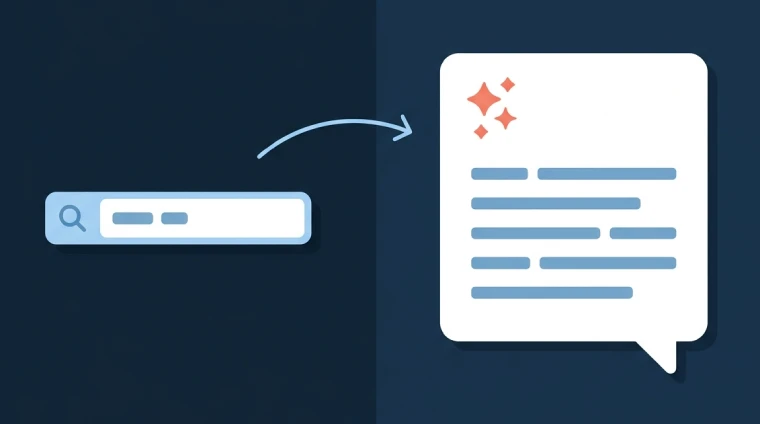
Map Questions, Not Just Keywords
You find these questions in three places. Read the "People also ask" box in Google, go through your own customer dialogues for full sentences and questions, and ask the AI engines directly what they know about your industry.
Test Your Industry's Key Questions Yourself
Ask the most central questions in your industry to ChatGPT, Perplexity, and Google AI Mode. Note which websites get cited as sources, and which questions nobody has answered well yet. This gives you a direct plan for the content you should create.
This is the core of AEO, optimization for AI answers. We cover the full discipline in our article on AEO optimization, and offer it as a dedicated AEO service for businesses that want to be cited by AI engines.
AI Keyword Research: Can You Use ChatGPT for Keyword Research?
Yes, for part of the job. ChatGPT, Claude and Gemini are good at suggesting the questions and phrasings customers might use, and at grouping a long list by topic. They have no search volume data. Ask for numbers and they invent them, and the invented numbers look plausible.
How We Use AI for Keyword Research
We let the AI suggest 30 to 50 questions around a service, then check every one in Keyword Planner or Ahrefs. When we checked twelve suggested phrases for this guide, three had no measurable searches at all. The rest went into the list with real volume, a difficulty score, and a page to map them to.
Which AI Is Best for Keyword Research?
The one connected to real data. Ahrefs, Semrush and Ubersuggest now put AI on top of their own keyword databases, so the volumes are real. A plain chatbot is best used as a brainstorming partner before you open the tool, not as the tool.
How to Find AI Keywords
AI keywords are the long, conversational questions people ask ChatGPT and Google AI Mode. Find them in three places: the "People also ask" box, your own customer emails, and by asking the AI engines what they know about your industry. Then note which sources they cite. If nobody has a good answer yet, that is your next article.
Long-Tail Keywords: Where Smaller Players Win
Long-tail keywords are longer, more specific searches with lower volume, but higher buying intent. For smaller businesses, long tail is often the best road to visibility, because the competition is lower and the relevance higher.
Compare "dentist" with "emergency dentist open Saturday in Austin". The first keyword has huge volume and brutal competition from every direction. The second has low volume, but the person searching wants an appointment today, in your city.
Geographic variations are especially valuable for local service businesses. Add your neighborhood, city, or region to your keywords, and you reach customers who have already decided to choose local. We cover this in detail in our guide on local SEO.
Keyword Mapping: From Keywords to Pages
Each keyword maps to one specific page, and each page gets one primary keyword. If you use the same keyword on several pages, the pages compete against each other in Google, a problem called cannibalization.
Informational searches, like "how to choose an accountant", belong on a blog post that explains and gives advice. Transactional searches, like "accountant for small businesses in Boston", belong on a service page with prices, contact details, and a clear booking button.
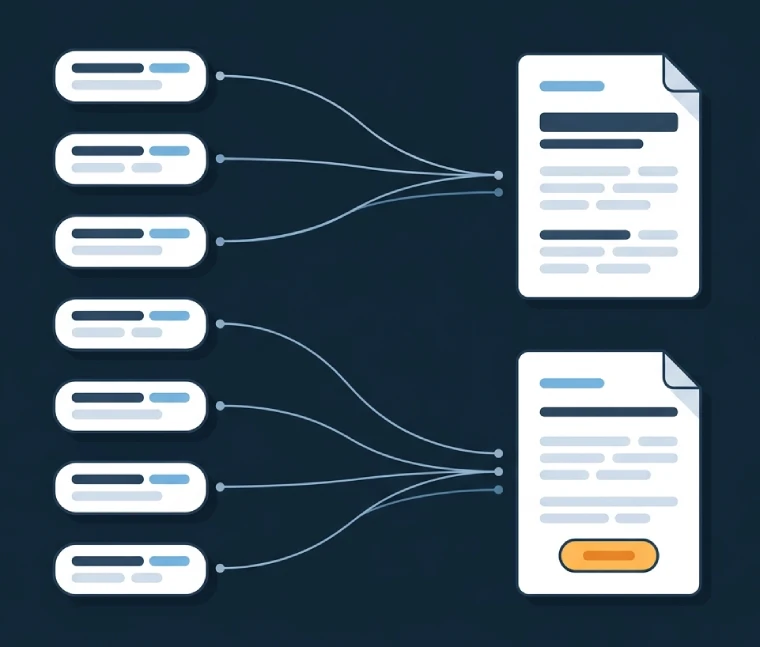
Link from blog posts to relevant service pages. If you write a guide about bookkeeping, link on to your accounting services page. This helps both the reader and Google understand how the pages on your site belong together. We cover the writing itself, including structure and phrasing, in our guide on SEO writing.
A Simple Keyword Research Template
You do not need special software for keyword mapping. A spreadsheet with six columns does the job, and this is the one we use.
| Column | What goes in it |
|---|---|
| Keyword | One phrase per row, including the long questions |
| Volume | Monthly searches from Keyword Planner or Ahrefs |
| Intent | Informational, navigational, commercial or transactional |
| Difficulty | The tool's score, or your own judgment of the top five |
| Page | The URL that should rank, existing or planned |
| Current position | From Search Console, so the page 2 keywords stand out |
Keyword Research for Google Ads
The keyword research you do for SEO also drives paid campaigns in Google Ads. The list of transactional keywords is the same, and Keyword Planner shows what you can expect to pay per click for each of them. Doing the research once therefore prepares both channels at the same time.
The difference lies in what you do with the list. In SEO you pick keywords you can win organically over time. In Google Ads you buy visibility on transactional keywords immediately, and many businesses combine both. PPC keyword research adds one extra filter: the click price, which decides whether a keyword is worth buying. Want help with the paid side? Read more about our Google Ads advertising.
The Best Keyword Research Tools, Free and Paid
The best free keyword research tools are the ones from Google: Keyword Planner for volume, Search Console for the keywords you already rank for, and Trends for direction over time. The free tiers of Semrush, Ahrefs and Moz fill the gaps with competition data, until your needs outgrow them.
| Tool | Use Case | Price |
|---|---|---|
| Google Keyword Planner | Estimated search volume and keyword suggestions | Free |
| Google Search Console | See which keywords already bring traffic to your site | Free |
| Google Trends | See whether a keyword grows or declines over time | Free |
| Google Autocomplete and "People also ask" | Find related searches and questions directly in the search field | Free |
| Semrush Keyword Magic Tool | Large keyword database with filters for questions and intent | Free, with daily limits |
| Ahrefs Free Keyword Generator | Quick keyword ideas with volume and difficulty scores | Free |
| Moz Keyword Explorer | Keyword suggestions with volume, difficulty and SERP data | Free, limited monthly searches |
| Ahrefs or Semrush | Detailed competitor analysis and volume data for advanced research | Paid |
Common Keyword Research Mistakes
The most common mistakes are chasing volume without thinking about intent, using industry jargon customers never search for, and doing the research only once. All of them are easy to avoid with a little awareness.
- Chasing volume instead of intent: A keyword with high volume but the wrong intent brings visitors, not customers.
- Using jargon customers never search for: The business calls it "complementary nutritional counseling", the customers search "meal plan for weight loss".
- Doing the research only once: Search habits change, and new services need new keywords. Set aside time to update the research at least yearly.
- Ignoring page 2 keywords in Search Console: These words already rank, and often need only a light polish to reach the top 10.
- Skipping the questions people ask AI: Without them, you miss citations in ChatGPT and AI Overviews, a source of visibility in strong growth.
Want to review your whole website, not just the keywords? You find a thorough walkthrough in our SEO analysis guide.
Where Should You Start? Prioritizing by Effort and Effect
Start with the measures that give high effect for low effort, like a Search Console review and geographic long-tail keywords. Save the heavier work, like a full mapping of AI questions, until the easy wins are in the bank.
| Measure | Effort | Effect | Get Started |
|---|---|---|---|
| Check Search Console for page 2 keywords | Low | High | Log in to Search Console today |
| Map your customers' own questions from email and phone | Low | High | Review your last 20 customer inquiries |
| Add geographic long-tail keywords | Medium | High | List the areas and cities you serve |
| Test your key questions in ChatGPT and AI Mode | Medium | Medium to high | Ask five questions and note the cited sources |
| Full competitor analysis with a paid tool | High | Medium | Wait until the easy wins are covered |
Frequently Asked Questions About Keyword Research
What is keyword research?
Keyword research is the process of finding out which words and questions your customers use when they search, and then choosing which of them your business should target. The result is a prioritized list of keywords, each mapped to a specific page on your website.
What is the difference between keyword research and keyword analysis?
They describe the same work, and the terms are used interchangeably. Research emphasizes finding the words people search for, while analysis emphasizes evaluating them by volume, intent, and competition. In practice, both belong to the same process and end in the same prioritized list.
Which free tools can I use for keyword research?
Google Keyword Planner gives estimated search volume, Google Search Console shows keywords that already bring you traffic, and Google Trends shows how interest develops over time. Autocomplete and the "People also ask" box in Google search give free suggestions for related searches and questions.
Is Google Keyword Planner free?
Yes. Keyword Planner is free with a Google Ads account, and you do not need to run ads or spend money to use it. Without active campaigns, the tool shows volume ranges instead of exact numbers, which is precise enough for most keyword research.
How often should I update my keyword research?
Update the research at least once a year, and always when you launch new products or services. Search habits and competition change over time, and a list that is several years old often paints a false picture of today's market.
How many keywords should one page target?
Each page needs one clear primary keyword, supported by a few closely related terms that naturally belong together. If you target too many different primary keywords on the same page, the message becomes unclear for both readers and Google.
Do I still need keyword research when people search in ChatGPT?
Yes, but the research must expand to cover longer, conversational questions, not just short keywords. People ask AI engines different questions than they type into a Google search, and you need to map those questions separately to earn citations.
Can I use ChatGPT for keyword research?
Yes, for brainstorming questions and grouping keywords by topic. ChatGPT has no search volume data, and it will invent numbers if you ask for them. Check every suggestion in Google Keyword Planner or a paid tool before you build a page around it.
What is the difference between keyword research and an SEO audit?
Keyword research finds the words to target. An SEO audit reviews the whole website: technical setup, content, links and speed. Keyword research is one part of a full audit. For a free check of your site, the SEO audit at brokenlinkchecker.io runs a full review in a few minutes, and completed more than 500 audits in August 2026 alone.
Can a beginner do keyword research?
Yes. The seven steps above need nothing more than a Google account and a spreadsheet. Start with Search Console and the "People also ask" box, and leave the paid tools until you have used up the easy wins. Our guide to SEO for beginners covers what to do once the list is ready.
What does keyword research cost?
The price depends on the size of your website and the scope of the analysis. See our page on SEO services for current prices, or contact us for a concrete quote based on your business.
Conclusion
Keyword research decides what you write about, which pages your website needs, and the order to build them in. With it, you know exactly what your customers are looking for, both in Google and in AI engines. Without it, you write about what interests you, like the plumber in the example above.
Start simple with the free tools, map the questions your customers actually ask, and prioritize by what gives the most back for the effort. Once your list is ready, our 15 SEO tips show you how to put the keywords to work. Want the research done thoroughly and tied to a concrete plan? Read more about our SEO services.