

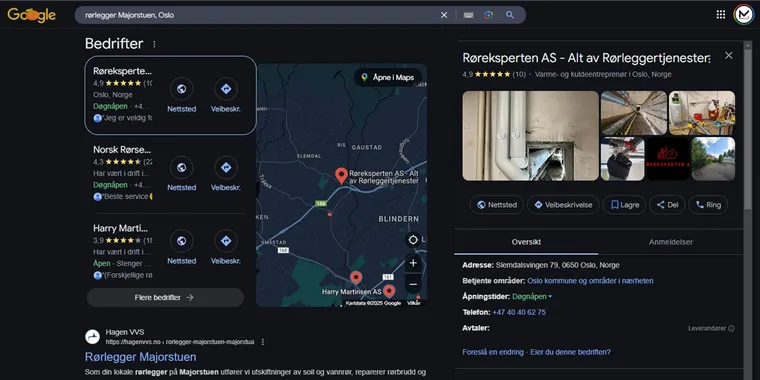
Local SEO makes your business visible when people nearby search for what you offer. The goal is to appear in Google, Google Maps, and AI answers when someone searches for “dentist in Austin” or “plumber near me”.
This guide shows you how local search works and what you can do yourself. You don't need any technical background. Follow the steps, and you'll build a solid foundation. You also get the Google Business Profile checklist we use with clients, a section on "near me" searches, and an example from our own client list.
In Short
Local SEO (local search engine optimization) is the work of making a business visible in Google, Google Maps, and AI answers when people search in its area. The most important tools are a complete Google Business Profile, steady reviews, and consistent business information across the web.
What Is Local SEO?
Local SEO is search engine optimization aimed at a specific geographic area. Regular SEO is about becoming visible across the whole country. Local SEO is about becoming visible where your customers live.
When you search for something local, Google often shows a map with three businesses at the top. This box is called the local pack. A spot there gives you visibility every day, without paying for ads. Below the map come the regular search results, which can also show local matches.
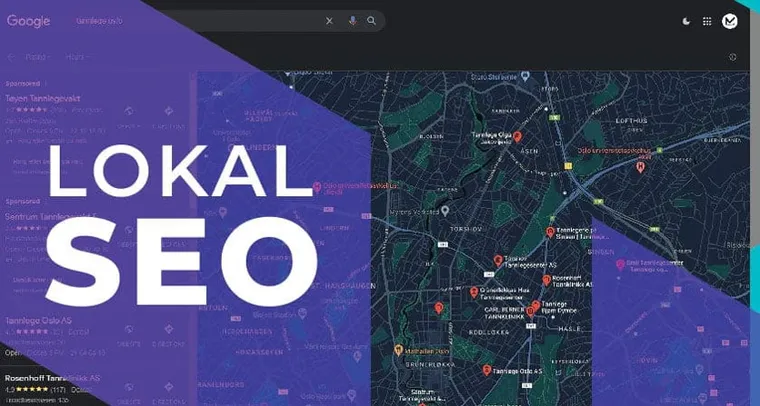
Local SEO suits anyone who gets customers from a defined area. Typical examples are tradespeople, dentists, hairdressers, lawyers, gyms and shops. You don't need a physical store. Google lets you define a service area instead of a visiting address.
Completely new to search engine optimization? Then start with our guide on what SEO is.
If the business needs visibility nationwide, not just locally, our SEO service covers the broader work.
Why Local SEO Matters
Someone searching locally is often ready to buy. They're not looking for information, but for someone to contact. That's why local searches often generate more inquiries than other forms of marketing.
Reviews matter a lot for the choice. 97 percent read reviews before choosing a local business. In 2026, 41 percent say they always do, up from 29 percent the year before. That's according to BrightLocal's consumer survey of 1,002 US adults.
The same survey shows what the reviews have to deliver. 31 percent only use businesses rated 4.5 stars or higher, up from 17 percent the year before, and 74 percent look for reviews written in the last three months. One old five-star review is not enough.
Did you know? 45 percent of American consumers used AI tools like ChatGPT to find local businesses in 2026. The year before, the figure was just 6 percent. Source: BrightLocal Local Consumer Review Survey 2026.
How Google Evaluates Local Searches
Google has explained how local results are ranked. Three factors decide it: relevance, distance and prominence.
- Relevance: How well your business matches the search. The right category, clear service descriptions and location names on your website help Google understand what you offer.
- Distance: How close the business is to the person searching. You don't control this, but a correct address and a clear service area ensure Google places you correctly.
- Prominence: How well-known and trustworthy the business appears. Reviews, local links and consistent business information everywhere build this trust.
You can't influence distance. Relevance and prominence you can work on every week. That's where the steps below come in.
Local SEO Best Practices: 7 Steps That Work
1. Set Up and Complete Your Google Business Profile
Google Business Profile was formerly called Google My Business. The profile is free and is the single most important tool in local SEO. It controls how your business appears in Google Maps and in the local pack. Step by step is in our guide on how to set up Google Business Profile.
Make sure the profile includes:
- Correct name, address and phone number.
- The right primary category for what you do.
- Services with short, clear descriptions.
- Good photos of your premises, products or work.
- Updated opening hours, including for holidays.
Post regular updates to your profile. An active profile shows up more often than one that was set up and forgotten.
2. Collect Reviews and Respond to Them
Ask satisfied customers for a review right after finishing a job. Make it easy with a direct link to your profile. Respond to all reviews, including the negative ones. This shows both customers and Google that the business is active.
Don't buy reviews, and don't fake them. Google removes them, and your profile can lose visibility.
3. Find the Right Local Keywords
Find out what people in the area actually search for. Combine service and location, like "electrician in Denver" or "hair salon in Brooklyn." Include neighborhoods and nearby towns where natural. The method behind keyword research for local searches is the same as anywhere else, and our guide shows it step by step.
Use Google Keyword Planner or the suggestions in Google's search box. Write the words the way people speak, not the way the industry speaks. We also have a separate SEO writing guide.
4. Create Dedicated Pages for Services and Areas
Create a dedicated page for each important service, and preferably for each area you cover. A plumber in Portland could have a page for bathrooms, one for heat pumps and one for emergency help.
Write unique content for each page. Don't copy the same text and swap out the location name. Such pages give a poor impression and rarely rank well.
An example from our own client list: the coworking space The Box in Oslo was practically invisible for "office space Oslo", "coworking Oslo" and "meeting room rental Oslo" in the local language. We published the whole portfolio with one page per office solution, each with prices and a booking form. Since the SEO agreement started in May 2026, The Box shows up for those searches and gets cited in AI answers.

5. Keep Your Listings and Business Information Consistent
NAP stands for name, address and phone number. The information must be identical on your website, in Google Business Profile and in directories. Check your listings on Yelp, Apple Business Connect, and Bing Places, plus the directories that matter in your country and industry. If you want help with all of this, see our local SEO service.
Inconsistent information makes Google uncertain about who you are. This lowers trust, and visibility can drop.
6. Build Local Links and Mentions
Links from local websites tell Google that your business matters in the area. Local newspapers, trade associations, sponsorships and partners are good sources. A feature in the local newspaper can bring links, traffic and new customers.
7. Add Structured Data
Structured data is code that explains your content to search engines. For local businesses, LocalBusiness schema is most important. The code tells Google who you are, where you're located and when you're open.
Structured data also helps AI assistants understand and recommend your business. Ask your developer to add it, or get in touch with us.
Local SEO Checklist: The Seven Steps in Short
- Google Business Profile complete: name, category, services, photos, hours.
- A review link ready to send after every job, and every review answered.
- Keywords in the form "service + place", written the way customers talk.
- One page per service, and per area, with unique text.
- Identical name, address and phone number everywhere.
- Links and mentions from local websites.
- LocalBusiness schema on the website.
Common Mistakes to Avoid
- Outdated information in the profile, such as wrong opening hours or an old phone number.
- Bought or fake reviews.
- Inconsistent business information across websites.
- Reviews that never get a response.
- Area pages with copied text.
- A profile that was set up once and never touched again.
Google Business Profile: The Checklist We Use With Clients
We are a local business ourselves, with profiles in Oslo and on the island of Bømlo, and a 5.0 average on Google. Our front page ranks third for "digital agency in Oslo" in Norwegian, without a single ad. The list below is what we go through for clients, and what we use on our own profiles.
- The name is the business name, not "Company Inc. – plumber Denver". Google strips keywords from names, and the profile can get suspended.
- The primary category is the one you earn most from. Add up to nine secondary categories, but only ones you actually deliver.
- Service area or address: pick an address if customers come to you, a service area if you go to them. Both at once confuses the map.
- Services with prices where possible. "From $120" brings more inquiries than no price.
- At least ten of your own photos: the premises outside and inside, people and work. No stock photos.
- Opening hours including holidays. The "might be closed" label costs customers.
- A website link with tracking, so you can see in GA4 what the profile actually produces.
- Questions and answers: ask the five most common questions yourself, and answer them. Otherwise strangers will.
- One post a month, at least. An offer, a project, a new service.
- A review link saved on your phone, ready to send right after a finished job. Answer every review within a week.
Do these ten, and you are ahead of most competitors in your area. Few make it past point five.
Near Me Searches: How to Show Up for Them
"Plumber near me" is not a keyword you can put on a page. Google replaces "near me" with the searcher's location, so what ranks is the business that is close, relevant and trusted. Three things decide whether that is you.
- Location signals Google can read: a correct address or service area in Google Business Profile, city and neighborhood names in page titles and headings, and LocalBusiness schema with your coordinates.
- The right category: "near me" searches are matched against your primary category more than your page text. A wrong category means you never appear.
- A fast mobile site: almost every "near me" search happens on a phone, often on the street. A page that takes five seconds to load loses the call.
Do not write "near me" into your headings. Write the actual place names, and let Google do the matching.
The Best Local SEO Tools
You do not need paid tools to start with local SEO. Google Business Profile and Google Search Console cover the first year for most small businesses. Paid local SEO software earns its keep when you manage listings and reviews across many directories, or track rankings in several areas at once.
| Tool | Use Case | Price |
|---|---|---|
| Google Business Profile | Your listing in Google Search and Maps: information, photos, posts, and reviews | Free |
| Google Search Console | Shows which searches bring visitors, and flags indexing problems | Free |
| Moz Local | Syncs your business information across directories, and tracks reviews | Paid |
| BrightLocal | Local rank tracking, listing audits, and review monitoring | Paid |
| Semrush Local | Listing management, map rank tracking, and review management | Paid |
Local SEO in AI Search
More and more people are asking ChatGPT, Gemini and Copilot for recommendations, like "best electrician in Denver." Google also shows AI answers at the top in many searches. The work of becoming visible there is called AEO, or Answer Engine Optimization.
AI assistants pull answers from sources they trust. That means reviews, structured data, clear business information and content that answers questions directly. Doing the work in this guide therefore also strengthens your visibility in AI answers.
AI search passes the location along. This summer, a query showed up in our own Search Console that read, in Norwegian, "which agencies can help improve a business's online visibility?" followed by the words "my location is norway". That is what it looks like when someone asks an AI assistant, and the assistant attaches the position before it searches. Clear location information on your website and in your profile is what gets you included in the answer.
Want to go deeper? Read our article on AEO optimization, or see how we work with AEO as a service.
How Long Does It Take?
The first improvements in Google Business Profile often appear after four to eight weeks. Solid rankings in local searches usually take three to six months. The timeline depends on the competition in your area and industry.
In smaller cities with few competitors, it goes faster. There, a well-completed profile and steady reviews can show a visible effect within a few weeks.
Frequently Asked Questions
What is local SEO?
Local SEO is search engine optimization aimed at a geographic area. The goal is to appear in Google, Google Maps and AI answers when someone nearby searches for what you offer.
What does local SEO cost?
The price depends on the competition in your area and how much work is needed. At Mementor, local SEO starts at $499 per month, with no lock-in period. You can also do much of the groundwork yourself.
What is local SEO vs SEO?
Regular SEO is about ranking nationally for what you sell. Local SEO is about appearing in the map pack and the local results when someone nearby searches. The tools differ in part: Google Business Profile, reviews and directories matter more, links from across the country matter less. The website has to be fast and clear in both cases.
Is local SEO free?
The most important parts are. Google Business Profile, Search Console and the major directories cost nothing, and the seven steps in this guide need only your time. Paid tools and agency help become worth it when you run several locations or compete in a crowded city.
How much should I pay for local SEO?
At Mementor, local SEO starts at $499 per month with no lock-in. Whatever you pay, insist on owning the Business Profile and the website yourself, a monthly report on inquiries, and no promises of a guaranteed map position. Nobody can promise that.
Can I do local SEO myself?
Yes, you can lay the groundwork yourself. Fill out your Google Business Profile, collect reviews and clean up your business information. Landing pages, structured data and link building require more time and experience.
Which local SEO tools should I use?
Start with the free ones: Google Business Profile for your listing and Google Search Console for tracking. Paid local SEO software like Moz Local, BrightLocal, and Semrush Local helps you manage listings and reviews across many directories at once. Most small businesses only need the free tools in the first year.
How do I learn local SEO?
Work through the seven steps in this guide, they cover the whole foundation. Then follow BrightLocal's research and Google's own guidelines for Business Profile to stay updated. Most of local SEO is steady routine work: fresh information, new reviews, and small monthly improvements.
How long does it take to see results?
Expect four to eight weeks before you see the first changes. Solid rankings usually take three to six months.
Do I need local SEO without a physical store?
Yes, if your customers come from a defined area. Google lets you define a service area instead of a visiting address. Tradespeople and home services are typical examples.
Conclusion
Local SEO is one of the most profitable things a local business can spend time on. Start with Google Business Profile, collect reviews and keep your business information consistent everywhere. Then build further with dedicated pages, local links and structured data.
Want help? We'd be happy to look at your visibility. Read more about our local SEO service, or request a free assessment. If you're a beginner, we also recommend the SEO guide for beginners. See more tips on SEO here.