
A website should bring in customers, not just look nice. A well-planned redesign delivers faster pages, more inquiries, and better visibility in both Google and AI search.
In this guide, you'll get the steps, prices, and requirements you need to know. You'll also see how we chose between a refresh and a rebuild for three clients and for our own website, and what it delivered. At the end, you'll find a checklist and answers to the most common questions.
In Short
Start with clear goals and a solid understanding of your target audience. Create a simple structure with clear calls to action. Ensure fast load times, mobile-friendliness and universal design from day one. Build the content for both Google and AI search. Test in staging, set up 301 redirects and arrange for ongoing maintenance before you launch.
Why Consider a New Website Design?
Many businesses have websites that are four to five years old or older. The content may still be good, but the design and technology often fall behind. Design trends, security requirements and the way people search change quickly.
Typical signs that your website needs a refresh:
- The design looks outdated and creates a poor first impression
- The site performs poorly on mobile, and nearly half of all web traffic comes from mobile (StatCounter, August 2026)
- Few visitors get in touch or make a purchase
- The publishing solution is outdated and increases the risk of security vulnerabilities
- The website doesn't appear in either Google or AI answers
What should you consider when planning a new website design? Define your goals, understand your users and create a structure that makes it easy to take action. At the same time, ensure performance, universal design and visibility from the start. The advice is simple: build SEO in from the start, and you avoid fixing it later.
Define Goals and Target Audience
A redesign without clear goals rarely succeeds. First, decide what the website should achieve:
- More inquiries from the right customers
- More sales and easier checkout, read more about starting an online store
- A stronger brand that people trust
- Simpler customer journeys and fewer support inquiries
Understanding your target audience is just as important. Use data from Google Analytics, simple surveys and conversations with your customers. What do people come to the website to do? What stops them? The answers guide the structure, content and design.
Analyze the Current Website
Don't throw everything out. First, analyze what's working today. Tools like Google Analytics and Hotjar show which pages people use, where they drop off and what creates value. Look at traffic sources, keywords and technical bottlenecks.
Common mistakes include long forms, cluttered menus, weak internal linking and slow load times. Many redesigns fail because they don't carry forward the lessons learned from the old solution.
Structure and User Experience
A clear structure is the foundation of good website design. Start with a sitemap and simple sketches before choosing colors and fonts. Good menus, a short path to action and clear buttons lead to more inquiries.
Read more about the whole process in the guide From Idea to Website.
Design, Brand and Modern Expression
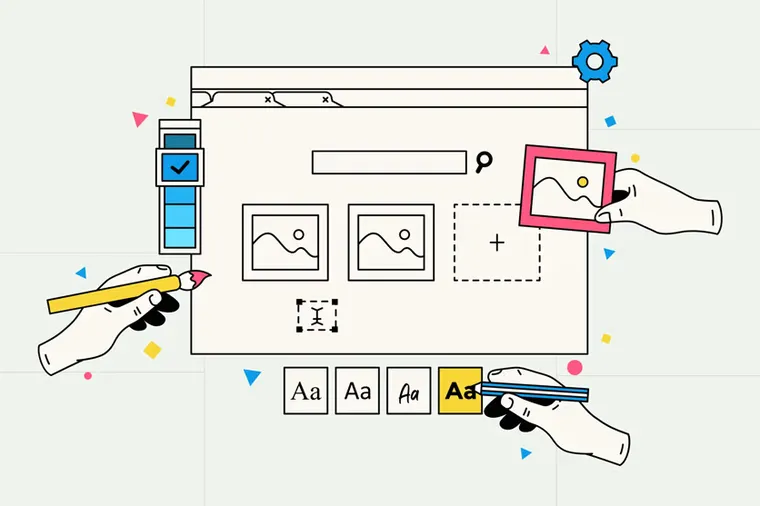
Your website design should reflect your brand. Consistent colors, fonts and images across the site build recognition and trust. In 2026, we're seeing these trends:
- Larger typography and more whitespace in the design
- Clear contrast colors that work in both light and dark mode
- Real photos and video instead of stock images, because they build credibility
The most important thing, however, is balance. The design should be attractive while remaining easy to use. Choose elements that support the message, not elements that steal attention from the action you want visitors to take. If the brand itself needs a refresh, we have written about a new logo and brand identity without losing recognition.
Technology, Performance and Accessibility
Fast load times and mobile-friendliness are crucial for both users and Google. Google measures performance with Core Web Vitals, and the targets are easy to remember:
- LCP under 2.5 seconds: the main content should load quickly
- INP under 200 milliseconds: the page should respond quickly when you click
- CLS under 0.1: the content shouldn't shift while the page loads
Use modern image formats like AVIF and WebP, lazy loading, good caching and few heavy scripts. Measure these values regularly and fix bottlenecks as they arise.
Accessibility is a legal requirement in most markets, not a nice-to-have. In the EU, the European Accessibility Act has applied since June 28, 2025, and covers online stores, banking and ticketing. In the US, websites are sued under the ADA every week. Norway, where we are based, requires private businesses to meet 35 WCAG 2.0 criteria at levels A and AA. The common standard behind all of them is WCAG, and WCAG 2.2 at level AA is the safe target for a new site.
Build for accessibility from the start. Good accessibility provides a better user experience for everyone and often leads to more inquiries. Text-to-speech is one of several measures that make content accessible to more people.
Visibility in Google and AI Search
A redesign is a golden opportunity to build visibility into the website itself. SEO is about being found in Google. AEO is about being cited in AI answers. Both start with a good structure and clear content.
Google launched AI Mode in Norway in October 2025, and AI Overviews are already appearing in Norwegian searches. More and more people are also asking ChatGPT and Perplexity for advice before choosing a supplier. Content with clear answers, concrete figures and a well-organized structure is more often pulled into these answers.
If you are planning a redesign now, you should also know about WebMCP, a new standard that lets AI agents use your website directly. Read what WebMCP means for new websites.
Here's how to build visibility into your redesign:
- Plan keywords and topics before writing the text; if you're new to the subject, read what SEO is
- Answer common questions directly, early in the text
- Use descriptive headings, short paragraphs and bullet lists
- Add structured data such as FAQ and article markup
- Show who is behind the content, with a named author and relevant expertise
If you want to go deeper, read our guide on AEO optimization or see how we work with AEO as a service.
Refresh or Rebuild?
The first decision in a redesign is not colors, but whether to refresh what you have or build new. We ask three questions: Is the publishing platform still secure and supported? Can the structure you need be built in it? Is the content worth keeping? Three yeses mean refresh. One no means rebuild. This is how it played out for three clients and for us.
- Refresh: The Box. WordPress with Elementor Pro was secure and suited a team that edits everything itself. We took over operations from another agency, redesigned the site, published the whole rental portfolio with prices and built a custom booking flow on top. No new platform, no migration.
- Rebuild while trading: VuggeBaby. The online store could not close. We rebuilt it module by module on the existing WordPress and WooCommerce setup, with the client selling at full speed the whole time. Revenue more than doubled against the same period the year before.
- Rebuild: Stas Artist. The brief was a booking system with automatic routing, a tour schedule, an online store and more than 50 artist profiles in three languages. No template does that. We built it from scratch in Laravel with a custom control panel. The result: 507 percent more new users and 199 percent more from organic search in the first seven months.
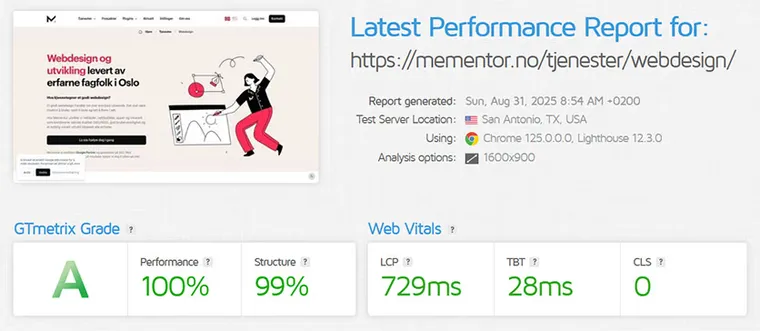
- Rebuild: ourselves. mementor.no got its new look in July 2026, built in Laravel in one month: 128 pages in two languages, 22 posts fact-checked, 100 out of 100 in PageSpeed on mobile and desktop. We kept the logo. The whole process is in how we built the new Mementor.
Note that we still recommend WordPress for most businesses. A rebuild in a custom framework is the answer when the requirements are special, not when the design is boring.
Costs and Budgeting
What does a website redesign cost? The price depends on size, design and features, and agencies price very differently. As a reference, GoDaddy's 2026 guide puts a one-page site from a freelancer or agency at $500 to $5,000 and large custom builds at $10,000 and up. We can only vouch for our own numbers, so here they are:
| Option | Price with us | Fits when |
|---|---|---|
| Web design as a service | $499 per month, no setup cost. After 18 months you own everything | You want a fixed monthly price with hosting and maintenance included |
| One-time price | From $7,999, fixed before we start | You want to own the site from day one |
| Service Level Agreement (SLA) | $112.50 per month on annual billing | Hosting, backups, updates and support after launch |
Online stores and solutions with integrations are priced after a review. What the market charges, and why the range is so wide, is covered in our guide to how much a website costs.
| Pricing model | When does it fit? | Advantages | Considerations |
|---|---|---|---|
| Fixed price | Clearly defined project | Predictable cost | Requires a detailed specification |
| Hourly rate | Projects that evolve along the way | Flexible | Ask for estimates and regular status updates |
| Ongoing agreement | Continuous improvement | Dedicated capacity and quick response | Clarify goals and deliverables |
If you'd rather pay a fixed monthly fee than a large one-time sum, take a look at website design as a service.
Choosing an Agency or Partner
Choosing a partner is one of the most important decisions in the project. Look for agencies with documented experience, genuine references and a clear process for insight, design, development and launch. Be wary of providers who promise fast results without first analyzing your target audience.
Ask these questions before you choose:
- Can you show examples and results, such as increased conversion or faster page speed?
- What does the process look like, and who actually does the work?
- What does it cost, and what's included in the price?
- How do you handle SEO, tracking and universal design?
We've gathered more advice in the article on choosing a website design agency.
Ask the same of us. Our own website is the reference: 100 out of 100 in PageSpeed, built in one month, and every number in this guide has a source. Mementor is a digital marketing agency that designs, builds and runs websites, so you avoid three suppliers blaming each other.
Request a no-obligation quote, and we'll show you how we would plan your redesign.
Testing, Launch and Ongoing Maintenance
Test the website thoroughly on various devices and browsers before launch. Set up a staging environment and try out forms, speed, error messages and accessibility. Remember 301 redirects from old addresses to new ones, or you'll lose the visibility you've built up in Google. Google describes the procedure in its documentation for site moves with URL changes.
Website Redesign and SEO: How Not to Lose Your Rankings
Most ranking losses after a redesign come from four mistakes, and all four are avoidable.
- URLs changed without redirects. Export every indexed URL from Search Console before you start, and map each one to its new address. Redirect one to one, not everything to the front page.
- Content that ranked was cut. A page with 300 visits a month from Google is an asset, however dated it looks. Rewrite it, do not delete it.
- Titles and headings rewritten for style. The words people search for have to stay in the title and H1. Make them better, not different.
- Staging site left open to Google. Block it with a password, not just a noindex tag, and remove the block on launch day.
We learned this ourselves. After our July 2026 relaunch, our own check found 21 English URLs without a redirect, because the English paths had been shortened while the Norwegian ones kept theirs. They were fixed the same day, and the check now runs automatically before every launch. Make your list of old URLs before you start, not after.
The work doesn't stop at launch. The website must be updated, secured and monitored. A dedicated maintenance agreement gives you experts who look after the solution. Also set measurable goals and track progress over time.
Checklist: 10 Things to Remember Before a New Website Design
- Define clear goals
- Know your target audience
- Analyze the current website
- Create a sitemap and sketches
- Design mobile-first
- Optimize speed and Core Web Vitals
- Plan for visibility in Google and AI search early
- Ensure universal design
- Budget realistically, remember maintenance
- Test thoroughly and plan for upkeep
Frequently Asked Questions About New Website Design
How much does it cost to redesign a website in 2026?
With us, web design as a service costs $499 per month with no setup cost, and a one-time price starts at $7,999. A Service Level Agreement adds $112.50 per month on a one-time purchase. GoDaddy puts freelancer and agency builds at $500 to $5,000 for a one-page site and $10,000 and up for large custom builds.
Should I redesign or rebuild my website?
Refresh if the publishing platform is secure, the structure you need can be built in it, and the content is worth keeping. Rebuild if any answer is no. Most businesses land on a refresh in WordPress. A rebuild in a custom framework is for special needs, like booking systems or multilingual portals.
How can I redesign my existing website?
Start with the numbers: which pages bring visitors and inquiries today. Keep those, fix the structure, then the design. Set a speed target in PageSpeed before you start, build accessibility in from day one, and redirect every old URL. The ten-point checklist in this guide covers the order.
How often should you refresh your website?
There's no fixed rule. Many businesses refresh their design every three to five years. Instead, look for the warning signs: poor mobile experience, slow load times, few inquiries or an outdated look.
How long does a redesign take?
A simple business website often takes four to eight weeks. Larger solutions with an online store or integrations tend to take eight to twelve weeks or more. Our own 128-page site took one month from design to launch, with all content ready in advance. Content is what takes time, not code.
Will I lose Google rankings with a new website design?
Not if you plan correctly. Keep the content that's working, set up 301 redirects from old addresses and test everything before launch. That way, you carry forward the visibility you've already built.
What accessibility requirements apply to a new website?
Build to WCAG 2.2 at level AA and you cover most markets. The EU's European Accessibility Act has applied since June 2025, the US enforces accessibility through the ADA, and Norway requires 35 WCAG 2.0 criteria for private businesses. Text alternatives, keyboard navigation, contrast and readable structure are the core in every jurisdiction.
Conclusion
A new website design is an investment in growth, not just a facelift. Plan thoroughly, choose the right partner and build for your users, Google and AI search alike. That way, you'll get a website that pays off for years to come. Measure the results, learn and keep improving.
At Mementor, we're happy to help you from idea to finished launch. Get in touch today for a chat about your redesign.